
Introduction
Continuing the Google’s Cybersecurity Professional Certificate adventure, and more specifically Python in cybersecurity, today part II. As always, I’ll share the cliff notes on the courses as I go. Dense summaries of what actually matters.
As said: Automate Cybersecurity Tasks with Python – Part II
Continuing where we left off
Cybersecurity generates oceans of text: server logs, packet captures, user agents, file paths. Your job is to find the needle in the haystack, fast. This is where Python shifts from a calculator to a forensic microscope.
Most security data arrives as strings (text). Python treats strings as ordered sequences, meaning you can slice and dice them like a pro.
log_entry = "192.168.1.1 - admin - FAILED"
ip = log_entry[0:13]  # Slicing: gets "192.168.1.1"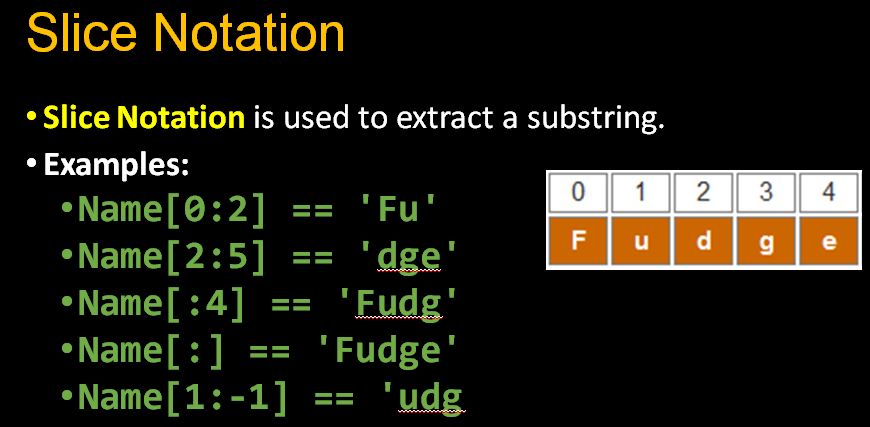
So what is it, this slicing?
- Indexing.
device_id[0]gets the first character - Slicing.
device_id[0:3]gets characters 0 through 2 - Finding.
log_entry.index("FAILED")returns the position of the first match (useful for parsing) - Methods.
.upper(),.lower()for normalization (since “Admin” and “admin” should match)
Crucial note: Strings are immutable. You can’t change them in place; you create new ones. This prevents accidental corruption of evidence logs.
Managing collections
While strings are immutable, lists are mutable containers perfect for managing dynamic data like active connections or blacklisted IPs.
suspicious_ips = ["10.0.0.5", "192.168.1.100"]
suspicious_ips.append("172.16.0.50")  # Add new threat
suspicious_ips.remove("10.0.0.5")     # Clear false positive
Some nice additions to this:
- Concatenation.
list1+list2combines threat feeds for example - Iteration. Loop through indicators of compromise (IOCs) to check against logs
- Index coupling. Match users to devices by position (though dictionaries are better for this)
Python regex
When simple string searching isn’t enough, Python regular expressions (regex) let you define patterns. Using the re module.
import re

# Extract all IP addresses from messy logs
pattern = r"\d{1,3}\.\d{1,3}\.\d{1,3}\.\d{1,3}"
ips = re.findall(pattern, log_text)
Explanation on some of this gibberish:
\dany digit\walphanumeric/underscore characters\swhitespace+one or more characters*zero or more characters{3}exactly three characters\.literal period (backslashes escape special characters)
Use cases: Pulling all email addresses from a leaked dump, finding device IDs starting with “R15”, or validating IP formats before processing.
File I/O
Security automation means processing files, thousands of them. The with statement ensures files close properly, even if errors occur.
# Reading
with open("access.log", "r") as file:
    logs = file.read()  # Entire file as one string

# Processing - split into lines
entries = logs.split("\n")

# Writing alerts
with open("alerts.txt", "a") as file:
    file.write(f"SUSPICIOUS: {ip}\n")
The parsing workflow:
- Read with
.read() - Split with
.split()(by newlines, commas, etc.) - Process with loops/conditionals
- Join with
.join()if writing back - Write with
"w"(overwrite) or"a"(append)
Automation in the real world
Python shines when embedded in security workflows.
- CI/CD Pipelines. Automatically scan code for vulnerabilities (SAST/DAST) before deployment
- Compliance. Verify configurations against standards and generate reports
- Real-time monitoring. Parse logs every 30 seconds, flagging users with >3 failed logins

Example workflow function:
def update_allow_list(file_path, remove_ips):
    with open(file_path, "r") as f:
        allowed = f.read().split()

    # Remove flagged IPs
    clean_list = [ip for ip in allowed if ip not
                  in remove_ips]

    with open(file_path, "w") as f:
        f.write(" ".join(clean_list))
The above:
- Reads the file and splits its contents into a list of IP addresses
- Filters out any IPs that appear in the
remove_ipslist (using a list comprehension) - Overwrites the original file with the cleaned list, joined back into a space-separated string
Debugging
Even security scripts have vulnerabilities. Python errors fall into three buckets:
- Syntax Errors. Missing colons, unclosed quotes. Python gives an error and flags the line for you
- Exceptions. Runtime crashes (IndexError, FileNotFound). Use
try/exceptor validate inputs - Logic Errors. The code runs but produces wrong results (checking
>instead of>=for login thresholds). These require:- Strategic
print()statements to trace execution - Debuggers (breakpoints in VS Code)
- Rubber-ducking with AI assistants (but verify their suggestions!)
- Strategic
Wrapping up
The modern security analyst doesn’t just read alerts, they automate the response. By combining string slicing for log parsing, lists for threat tracking, regex for pattern extraction, and file handling for evidence collection, you turn Python into a 24/7 security operations center.
Start small: automate one daily log check. Then another. Soon, you’ll have a Python-powered security apparatus that scales with the threat landscape.
Next
The Google Cybersecurity adventure is almost at an end. Next week we’ll cover Put It to Work: Prepare for Cybersecurity Jobs.