Introduction
I’ve been working through the CompTIA Security+ curriculum lately, starting with the information security foundations module. It covers a lot of ground, from the basics of the CIA triad all the way through to zero-day vulnerabilities and defensive monitoring. Rather than let those notes rot in a folder, I figured I’d write them up properly.
This is the first in a series of cliff notes posts as I work through the certification. Of course, it has a lot of overlap with the Google Cybersecurity series I did earlier this year, but I find it interesting nevertheless.
Let’s get into it.
The CIA triad
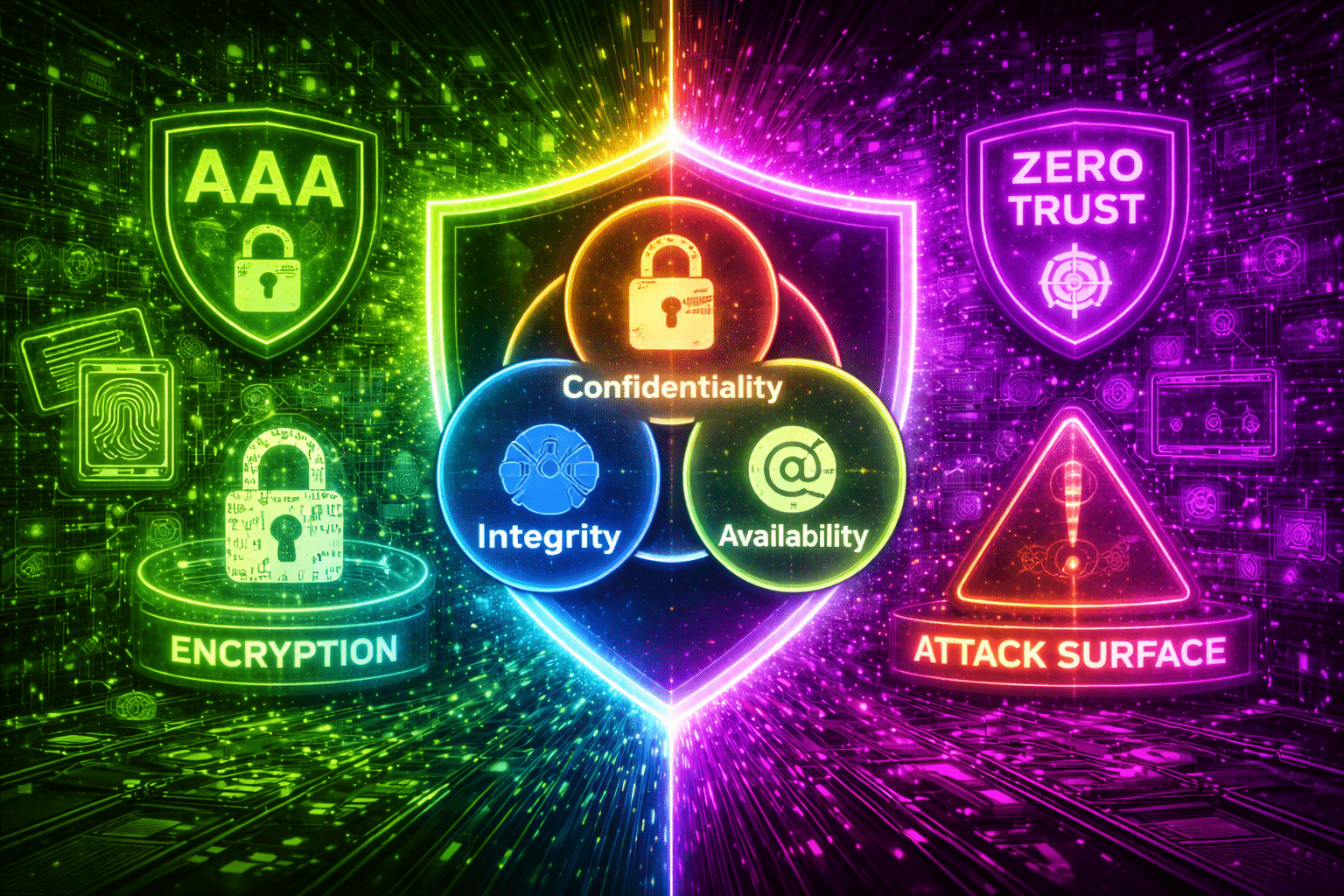
Everything in cybersecurity comes back to three core principles, collectively called the CIA triad. This is not the intelligence agency; CIA here stands for Confidentiality, Integrity, and Availability. These three ideas form the backbone of every security decision, policy, and tool you’ll encounter.
- Confidentiality means keeping sensitive information accessible only to authorized people. Your bank details, medical records, login credentials: none of that should be visible to anyone without a legitimate reason to see it.
- Integrity means ensuring data hasn’t been tampered with. It’s not just about theft; it’s about trust. If someone silently changes your bank balance from €1,000 to €10 without touching anything else, that’s an integrity violation. If a medical record gets altered to say you’re allergic to a medication you’re not, someone could get hurt.
- Availability means systems and data must be accessible when authorized users need them. A hospital that can’t access patient records because ransomware encrypted them is suffering an availability failure, even if no data was actually stolen.
Every security control, audit, and best practice maps back to protecting at least one of these three pillars.
Non-repudiation: proving who did what
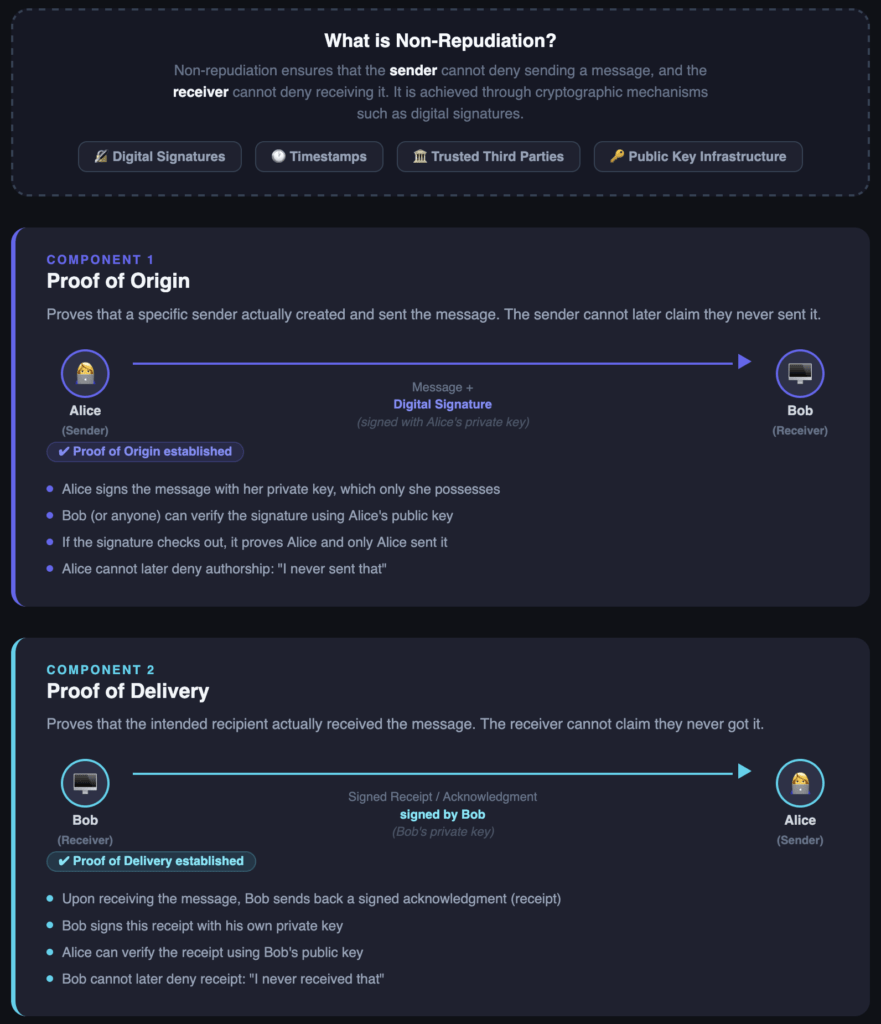
Alongside the CIA triad, there’s a fourth concept that matters a lot in practice: non-repudiation. This is the ability to prove that a specific action was performed by a specific person, so they can’t later deny it.
Think of it like a digital paper trail. A digital signature created with someone’s private key is mathematically unique. The recipient can verify it using the sender’s public key. If it checks out, you have cryptographic proof that the sender sent it, and that it wasn’t changed in transit.
This relies on two key elements:
- Proof of origin: the sender cannot deny they sent the message or file
- Proof of delivery: the recipient cannot deny they received it
Real-world examples include DocuSign (which captures time, IP address, and geographic data), S/MIME signed emails, and online banking transaction receipts backed by one-time passwords (OTP).
The weak link? Users who don’t protect their private keys. If someone else gets hold of it, they can sign on your behalf. Certificate revocation also becomes important here: if a certificate is compromised, it needs to be cancelled immediately or it can still be misused.
AAA: Authentication, Authorization, and Accounting
AAA is a framework that covers how identity and access are managed:
- Authentication: proving who you are (password, biometrics, smart card, MFA)
- Authorization: what you’re allowed to do once you’re in (role-based access, least privilege)
- Accounting: keeping a log of what you did and when (audit trails, session logs)
MFA (Multi-Factor Authentication) comes up constantly in this context. Adding a second factor (like a code on your phone) means stolen credentials alone aren’t enough to get in.
Security controls
Security controls are the mechanisms we use to protect systems. They fall into two dimensions: category (how they’re applied) and type (what they do).
Categories
| Category | What it covers |
|---|---|
| Technical | Firewalls, encryption, MFA, intrusion detection systems |
| Managerial | Policies, risk assessments, compliance standards (HIPAA, PCI DSS) |
| Operational | Day-to-day practices: incident response, log reviews, awareness training |
| Physical | Locked server rooms, badge entry, barriers, security guards |
Types
| Type | What it does |
|---|---|
| Preventive | Stops incidents before they happen (firewalls, strong passwords) |
| Detective | Finds problems when they occur (IDS, log monitoring, alerts) |
| Corrective | Fixes things after an incident (restoring backups, patching) |
| Deterrent | Discourages attacks (warning signs, visible cameras) |
| Compensating | Alternative controls when the ideal one isn’t feasible |
| Directive | Policies and guidelines on what people should and shouldn’t do |
A solid security posture uses all of these together. A firewall alone doesn’t help much if there’s no process for reviewing logs, no policy on passwords, and no lock on the server room door.
Encryption
Cryptography is a big topic, but the fundamentals are actually quite approachable.
Symmetric
Symmetric encryption uses one key to both lock and unlock data. It’s fast and efficient, great for encrypting large volumes of data. The problem is key distribution: how do you safely share that single key with someone else without it being intercepted?
Common symmetric algorithms:
- AES (Advanced Encryption Standard). The gold standard today, used in Wi-Fi (WPA2/WPA3), banking, government. Key sizes of 128, 192, or 256 bits
- DES (Data Encryption Standard). Obsolete; 56-bit key is too short by modern standards
- 3DES (Triple DES). Encrypts data three times for extra security, but slow; mostly seen in legacy systems
Asymmetric
Asymmetric encryption uses a key pair: a public key (anyone can have it) and a private key (only you). Data encrypted with the public key can only be decrypted with the private key. This solves the distribution problem; you can hand out your public key freely.
Common asymmetric algorithms:
- RSA (Rivest-Shamir-Adleman). Reliable and widely used, but slower than symmetric
- ECC (Elliptic Curve Cryptography). Strong security with smaller key sizes, great for mobile devices
- DSA (Digital Signature Algorithm). Used for verifying authenticity, not encrypting content
In practice, these two approaches are combined. HTTPS is a good example: your browser uses asymmetric encryption (RSA) to securely exchange a symmetric key with the server, then switches to AES for the actual data transfer. You get the security of asymmetric and the speed of symmetric, together.
Zero Trust
Traditional network security worked on the assumption that anyone inside the network perimeter was trusted. If you made it past the front door, you had the run of the building. Zero Trust flips this entirely.
The core principle: never trust, always verify, regardless of whether the user is inside or outside the network.
Zero Trust has five major components:
- User authentication. Beyond passwords: MFA, biometrics, continuous identity checks
- Device verification. Is the device managed, updated, and compliant?
- Least privilege access. You only get access to what you actually need for your role
- Micro-segmentation. The network is divided into zones; getting into one zone doesn’t mean you can move freely through others
- Continuous monitoring. The system watches behavior in real time and reacts if something looks off
The model runs on two layers. The control plane makes decisions (should this user be allowed in?).
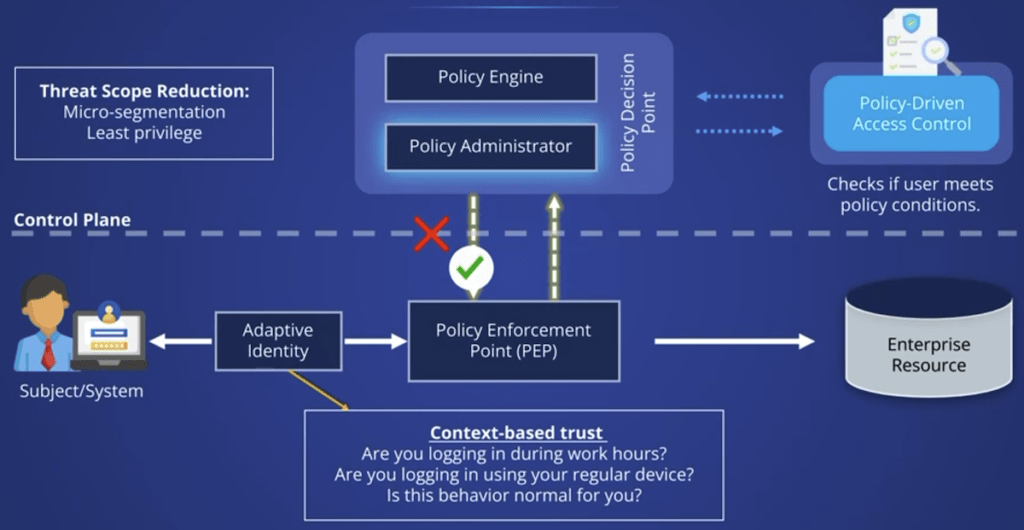
The data plane enforces them (actually opens or blocks the door).
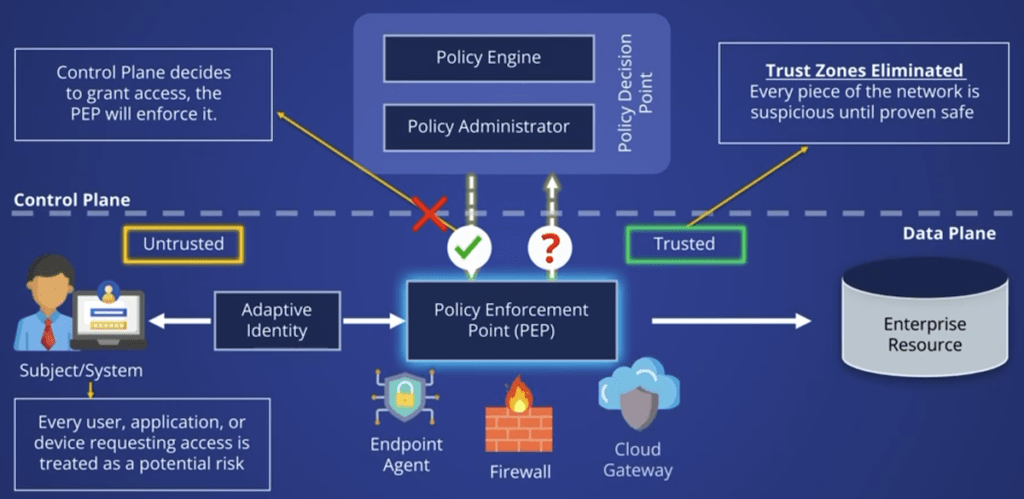
Zero Trust limits lateral movement. If an attacker gets into one part of the network, segmentation stops them from spreading. It also helps with insider threats; no one gets full access just because they’re an employee.
Threats, vulnerabilities, and risk
Three terms that often get conflated, but mean very different things:
- Threat: any potential danger that could harm your systems or data. Could be a hacker, malware, a phishing email, or a disgruntled employee
- Vulnerability: a weakness that a threat can exploit. An unpatched system, a misconfigured firewall, a weak password, a human who hasn’t been trained
- Risk: what happens when a threat meets a vulnerability. Risk = threat × vulnerability × potential impact
You can’t eliminate all threats, and you can’t patch every vulnerability immediately. But you can prioritize: focus on the vulnerabilities that, if exploited by a credible threat, would cause the most damage.
Threat actors
Not all attackers are the same. Understanding who they are helps you understand their goals and methods.
| Attacker type | Motivation |
|---|---|
| Nation-state actors | Espionage, sabotage, control over critical infrastructure |
| Script kiddies | Curiosity, boredom, bragging rights; low skill, pre-made tools |
| Hacktivists | Political or social beliefs (Anonymous is the well known example) |
| Insider threats | Financial gain, revenge, negligence; often the hardest to detect |
| Organized crime groups | Profit: ransomware, identity theft, fraud |
| Opportunistic hackers | Scanning for easy wins: open ports, unpatched systems, weak passwords |
| Shadow IT | Not necessarily malicious, but unmanaged devices and apps create real risk |
The insight here is that motivation shapes method. Nation-state attacks are patient and sophisticated. Script kiddies go for low-hanging fruit. Insiders have access you don’t expect. Knowing this helps you decide where to focus your defenses.
Attack surfaces
An attack surface is every point where an unauthorized user could try to enter or extract data. The more exposure you have, the more risk you carry.
There are three main types:
- Digital attack surface. Login pages, exposed APIs, open ports, unencrypted communications, outdated software with known vulnerabilities.
- Physical attack surface. Server rooms, USB ports on workstations, unmanaged IoT devices (smart cameras, printers), lost or unencrypted laptops. A USB drive plugged into an air-gapped workstation can be just as dangerous as a network exploit.
- Social engineering attack surface. This one targets people, not systems. Phishing emails, impersonation, pretexting. The 2013 Target breach is a good example of the supply chain variant: attackers didn’t break into Target directly; they got in through a third-party HVAC vendor, then moved laterally until they reached customer payment data.
Social engineering
Social engineering is often more effective than technical exploits because people are harder to patch than software.
The main techniques:
- Phishing. Fake emails designed to look legitimate, containing malicious links, attachments, or fake login pages. The 2020 Twitter hack started with a phishing email targeting internal employees
- Vishing (voice phishing). Phone calls impersonating IT support, banks, or law enforcement. The 2020 MGM breach used vishing to trick help desk staff into resetting credentials, exposing 10 million guests’ personal data
- Smishing (SMS phishing). Text messages impersonating delivery services, banks, or government agencies. Royal Mail smishing campaigns tricked thousands into handing over banking details
- Impersonation. Physically posing as a technician, contractor, or delivery person to gain physical access or trust
The defense isn’t just technical. Security awareness training, simulated phishing exercises, and a culture where people feel comfortable questioning unusual requests are just as important as MFA.
Zero-day vulnerabilities
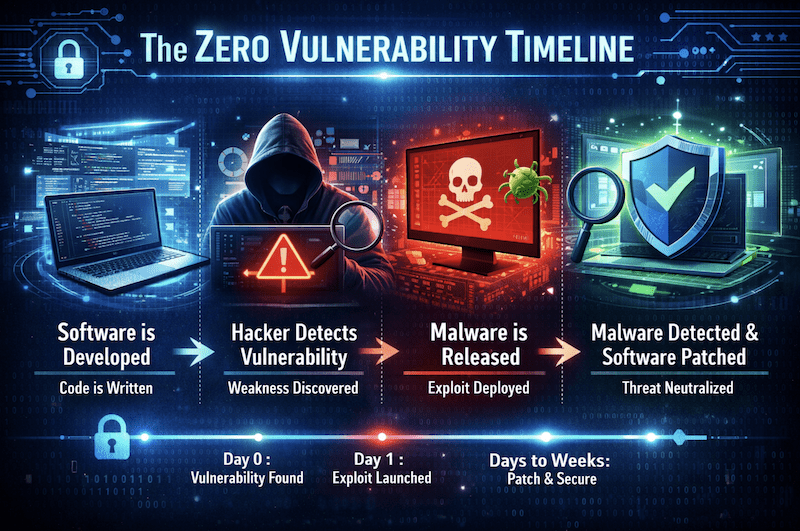
A zero-day vulnerability is a security flaw that the vendor doesn’t know about yet, or knows about but hasn’t patched. The name comes from the fact that developers have had zero days to fix it.
These are extremely valuable on the black market and dark web. The Pegasus spyware from NSO Group exploited a zero-day in iOS to infect iPhones through a WhatsApp message, no click required. Full access to microphone, camera, and messages.
You can’t patch what you don’t know is broken. Mitigations include:
- Installing updates immediately when patches do drop
- Using behavior-based detection tools (Endpoint Detection and Response, or EDR) rather than signature-based antivirus, which can only find known threats
- Applying Zero Trust principles: treating all traffic, including internal, as potentially compromised
Physical defensive security
Defense isn’t just software. Physical security matters just as much, and continuous monitoring ties everything together.
A layered physical defense includes:
- CCTV and IP surveillance: smart systems with AI-based motion detection and behavioral analysis
- Security guards: humans can spot things cameras miss: tailgating, suspicious behavior, unusual situations
- Lighting: well-lit areas reduce blind spots and make surveillance more effective, and motion-activated lights can startle intruders
When these three are integrated, you get a layered system: motion triggers lights, cameras capture footage and send alerts, a guard responds and investigates, and the system logs everything for later review.
On the digital side, continuous monitoring means real-time visibility into what’s happening across your environment: network traffic, access logs, system behavior. Tools like Security Information and Event Management (SIEM) systems aggregate logs from across your infrastructure so you can detect anomalies before they become incidents.
Bottom line
If I had to distill the entire foundations module into a few sentences:
- Every security decision maps back to Confidentiality, Integrity, and Availability
- Defense is layered: technical controls, operational practices, physical barriers, and people all work together
- Threats come from everywhere, including inside your own organization
- The weakest link is almost always human, which means training matters as much as tooling
Next
The next module dives into attack landscape, malware, physical intrusions, network exploitation, application vulnerabilities, detection techniques, etcetera. See you there.