Introduction
I spent a chunk of this week working through the operations and controls section of my CompTIA Security+ studies, and although the AI voice-over is annoying the f#ck out of me, it has some interesting material.
Quick disclaimer: it has a lot of overlap with the Google Cybersecurity series I did earlier this year, but I find it all interesting nevertheless.
Here are the key points I want to remember, written the way I’d explain them to a colleague over coffee.
Secure baselines
A secure baseline is basically a blueprint for how a system should be set up to be safe. Think of it as the recipe for a known-good machine, whether that machine is a laptop, a server, or a virtual machine sitting in someone’s cloud account. There’s no one-size-fits-all; a database server and a cloud storage bucket need very different setups. You decide what gets installed, what stays off, which settings are on or off, and how access is controlled, all based on what the system does, who uses it, and what data it touches.
The lifecycle has three stages:
- Establish. Decide what gets installed, which settings are on or off, and how access works, based on the system’s purpose, users, data, and threats
- Deploy. Push it out with configuration management tools rather than by hand, so every machine starts correct and drift gets flagged automatically
- Maintain. A setup that was secure six months ago may be useless today, so you revisit it, rescan for compliance, and document what changed, why, and who approved it
That last paper trail is essential during an audit, and maintenance is the stage people often forget.
Baselines are about balance, not lockdown. Crank the controls too tight and users will route around them, which creates more risk than you started with. Involve the technical teams and the actual users, because misconfiguration is one of the most common causes of breaches, and consistency at scale is the whole game.
Device hardening
Device hardening is reducing the attack surface, because every unnecessary feature is a door you have to guard. In practice that means:
- Close ports you don’t use
- Remove software nobody needs
- Strip admin rights from standard users
- Keep patches flowing
Wireless gets its own attention because radio waves don’t respect office walls. Encryption is key: WiFi Protected Access 3 (WPA3) is the current standard, replacing the older WPA2, paired with strong authentication so joining the network actually means something.
Mobile device protection extends this to phones and tablets, which wander off-site constantly. The tools that matter:
- Mobile Device Management (MDM) for pushing policy and remotely wiping lost devices
- Full disk encryption so a stolen phone is just a brick
- A sensible choice between Bring Your Own Device (BYOD) and company-owned models (CYOD/COPE), each trading convenience against control
Application security and sandboxing
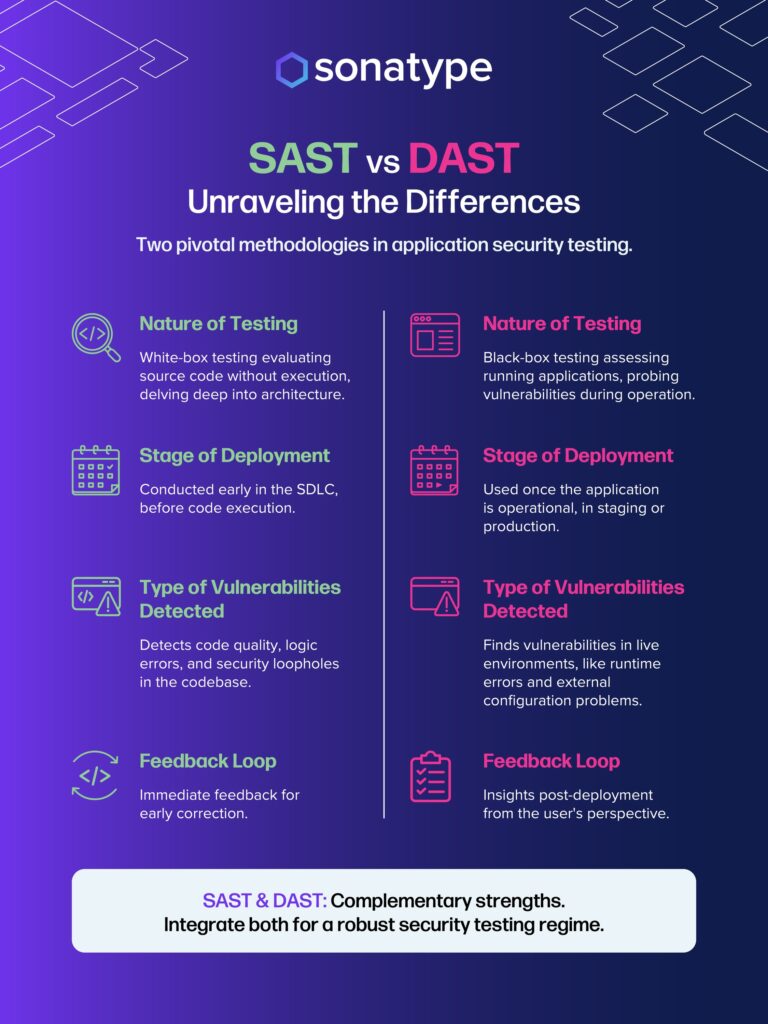
Applications are where a lot of real damage starts, so two ideas stood out. First, you secure code on both sides of the runtime: static analysis (SAST) reads the code before it runs to catch problems early, and dynamic analysis (DAST) watches the app while it’s running, especially under stress, to catch the weird behavior static checks miss. Together they catch both sloppy code and odd behavior that could open a door.
Second, sandboxing. A sandbox is an isolated space where you can run untrusted code or open a suspicious file without letting it touch the rest of the system; if it turns out to be malware, the blast radius is one disposable box. Run it in a box you can throw away, so if it’s malware you lose the box and nothing else.
IT asset lifecycle and governance
You can’t protect what you don’t know you own. Poor asset visibility means shadow devices, forgotten servers, and unpatched boxes nobody remembers buying, and each one is an unguarded entry point. Good governance tracks every asset from acquisition through active use to retirement.
Secure decommissioning is the unglamorous finale that quietly undoes everything else if you skip it. Deleting files or reformatting a drive does not actually remove the data; it can still be recovered. The things that actually matter at end-of-life:
- Sanitize properly. Use secure wiping or physical destruction, with the choice driven by sensitivity. Highly sensitive drive? Destroy it. Lower risk? A proper (secure) wipe may be fine
- Track every hand-off as equipment moves between departments and outside recyclers, because devices that aren’t logged are devices that go missing
- Set a data retention policy. Keep data too long and you widen the target for a breach, delete it too early and you may break a legal requirement
- Document the wipe or destruction, because regulators and auditors will ask for proof
Vulnerability management and threat monitoring
Vulnerability management and threat monitoring follow a satisfying loop: find, classify, fix, verify.
Finding weaknesses is active work, not waiting around. Routine vulnerability scanning runs automatically and produces a list of issues, but a scanner only finds what it already knows about, so its threat data has to stay current. You layer several methods, because no single one is enough:
- Package monitoring for risky third-party code
- Threat intelligence to learn what attackers are actually doing out in the wild
- Penetration testing where ethical hackers attack with permission to show how deep a real attacker could go
- Bug bounty programs that put more friendly eyes on your systems
- Internal configuration and asset audits that catch the forgotten server nobody patched
Once you’ve found things, you classify them so you know what to panic about. The Common Vulnerability Scoring System (CVSS, calculate your own here) gives a severity score, the Common Vulnerabilities and Exposures (CVE) list gives each known flaw a standard identifier, and you weigh that against your own context, because a critical flaw on an isolated test box matters less than a medium one on a public server.
Then you remediate. Patching is the obvious move, but the module was honest that you can’t always patch immediately, so you use compensating controls, segmentation, or temporarily accepting a documented risk while you plan the real fix. Crucially, you validate afterward; you rescan to confirm the fix actually worked rather than assuming it did.
The monitoring half of this module covered the tooling that watches in real time:
- Security Information and Event Management (SIEM) collects logs from everywhere and correlates them to surface the events worth caring about
- Security Orchestration, Automation, and Response (SOAR) takes the next step and automates the response itself
- Tool optimization ties it together: tune your alerts, because a system that cries wolf at everything trains analysts to ignore it
Network and system defense controls
Some controls work so quietly you forget they exist.
- DNS filtering sits right at the start of every web request. When a browser asks where a malicious site lives, the filter simply refuses to answer, blocking the connection before it even begins. It’s fast, light, and easy to apply across remote users, which is why it’s often the first line of defense.
- Web filtering goes deeper. Inspecting URLs against databases of known-bad sites, filtering by content category, and using reputation scoring to catch brand-new threats that haven’t made any blocklist yet.
You can deploy filtering as an agent on the device, which follows remote workers everywhere, or as a centralized proxy that funnels all traffic through one checkpoint.
The module also reinforced secure protocols: prefer the encrypted version of everything. Use Secure Shell (SSH) instead of Telnet, Hypertext Transfer Protocol Secure (HTTPS) instead of plain HTTP, and so on. The plaintext protocols still work, which is exactly why they’re dangerous; they hand your traffic to anyone listening.
Identity, access, and secure operations
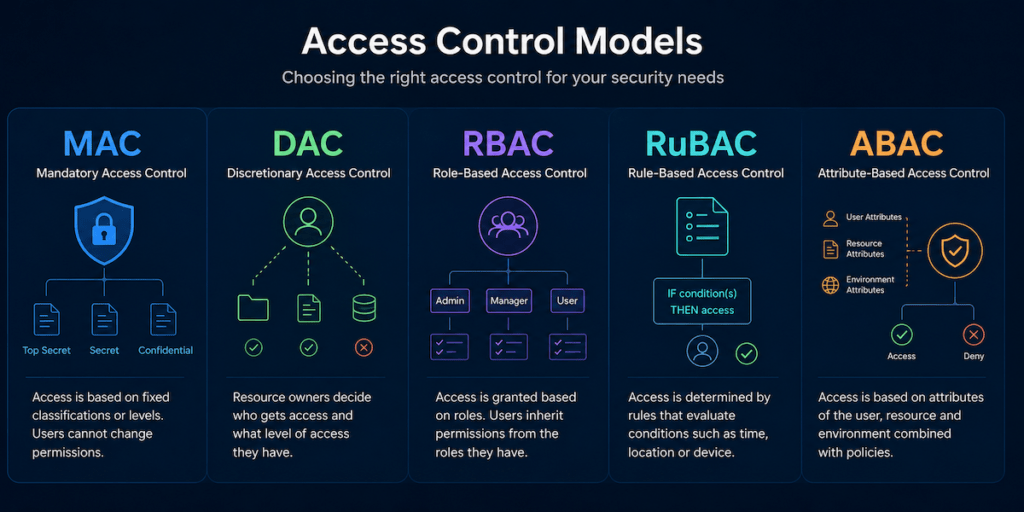
Once you’ve confirmed who someone is through authentication, access control decides what they’re allowed to do; it’s the difference between letting someone into the building and giving them keys to specific rooms. The models worth knowing:
| Model | How it decides access |
|---|---|
| Mandatory access control (MAC) | System enforces labels like “confidential” or “top secret”; users can’t override it. Common in government and military |
| Discretionary access control (DAC) | The file owner decides who else gets in. Flexible but error-prone; the default in Windows and Linux |
| Role-based access control (RBAC) | Access is tied to job roles, not individuals. Change jobs, change roles |
| Rule-based access control (RuBAC) | System rules based on conditions like location or device, not identity |
| Attribute-based access control (ABAC) | Considers department, device, time, and context together |
On top of the models sit the habits that limit damage:
- Least privilege. Give people only the access they need and nothing more, so a compromised marketing account can’t read payroll
- Time-based restrictions. Limit logins to working hours, which makes off-hours attacks and insider activity stand out
- Multi-Factor Authentication. A stolen password alone isn’t enough, because you also need a fingerprint, a hardware key, or a code from an authenticator app
The operations side leaned hard into automation and orchestration. Automating repetitive security tasks, provisioning, ticketing, routine responses, reduces human error and frees analysts for the work that actually needs a brain. The trade-off the module was honest about: automation done badly can propagate a mistake across the whole estate at machine speed, so you have to build it carefully. That being said, it’s pretty mandatory in this day and age.
Incident response and cyber investigations
When something does go wrong, you want a plan you rehearsed rather than improvising on the spot. Incident response follows a recognized lifecycle: preparation, detection and analysis, containment, eradication, recovery, and lessons learned. Containment before eradication is the part beginners skip; stop the bleeding first, then remove the cause.
Digital forensics is where this turned interesting, because it’s as much legal as technical. The process, roughly in order:
- Legal hold tells systems and people to stop deleting or altering data that might matter, freezing it in place
- Chain of custody is a detailed log of who handled each piece of evidence, when, and why; a hash acts as a fingerprint, and if the hash never changes, the evidence is provably untouched
- Acquisition means making exact bit-by-bit copies; you never, ever work on the original, just like a physical crime scene
- Preservation stores those copies in tamper-proof, often encrypted, storage, sometimes for years
- Reporting documents the evidence, the tools used, and the conclusions, sticking to proof rather than opinion
- E-discovery is the legal team searching through that digital data for specific evidence in a case
The thread running through all of it is that one careless step can get otherwise solid evidence thrown out. Logs are central to this whole effort, which is why log data investigation got its own treatment; your logs and other data sources are the raw material both for spotting an incident and for proving what happened afterward.
Wrapping up
Operations security is a set of loops, not a checklist. Baselines get maintained, vulnerabilities get found and verified and found again, incidents feed lessons back into preparation. The tools matter, but the discipline of doing the unglamorous parts consistently, decommissioning that old server, validating that patch, logging that hand-off, is what actually separates a secure organization from one that just owns security products.
Next
Next up is the last course in the Security+ curriculum. As hinted in my introduction I’m getting quite annoyed by the AI voice-over, so I’ll be glad to finish up the course material, study all my notes and tackle the certification.