
Introduction
Last in this series! As you know by now, I’ve been working through the CompTIA Security+ curriculum these last few weeks. It has a lot of overlap with the Google Cybersecurity series I did earlier this year, but it’s all interesting interesting nevertheless.
Here’s what module 4 (Cybersecurity Governance and Compliance) covers, distilled into something you can actually use.
GRC
Governance, Risk, and Compliance (GRC) is a framework that ties three things together so nothing falls through the cracks:
- Governance: who makes decisions, who’s responsible, how rules get set
- Risk: what could go wrong and what you do about it
- Compliance: following the laws and standards that apply to your industry
The key insight is that GRC doesn’t treat these as separate concerns. A company can have great security tooling but still get hit with a €20M GDPR fine because nobody thought about the compliance angle. GRC prevents that.
Popular GRC tools include RSA Archer, ServiceNow GRC, Drata, and Vanta. They track policy status, automate compliance checks, and keep audit evidence ready so you’re not scrambling when the auditors show up.
Governance
Security governance starts on paper. Three layers:
- Policies are the “what”. The Acceptable Use Policy (AUP), Information Security Policy, Incident Response Playbook, SDLC Policy, and so on
- Standards are the “how well”. E.g. passwords must be 12+ characters with mixed case, numbers, and symbols
- Procedures are the “step by step”. The exact actions to take when onboarding a new employee, rolling back a change, or responding to ransomware
Drop any one of these and the others stop working. A policy without a standard is vague. A standard without a procedure is unenforceable.
External governance
Beyond internal policies, organizations must comply with external laws and regulations, regardless of what their own policies say. The big ones you’ll probably see on the exam:
| Regulation | Scope |
|---|---|
| GDPR | EU personal data; applies globally if you handle EU residents’ data |
| HIPAA | US health information |
| PCI DSS | Payment card data |
| ISO 27001 | International information security management standard |
| NIST CSF | US framework for cybersecurity best practices |
Operating across borders means complying with all applicable jurisdictions simultaneously. Policies need to be reviewed at least annually and updated whenever systems or operations change; if your policy still talks about locking the server room door but everything’s in the cloud, it’s useless.
Governance structures and accountability
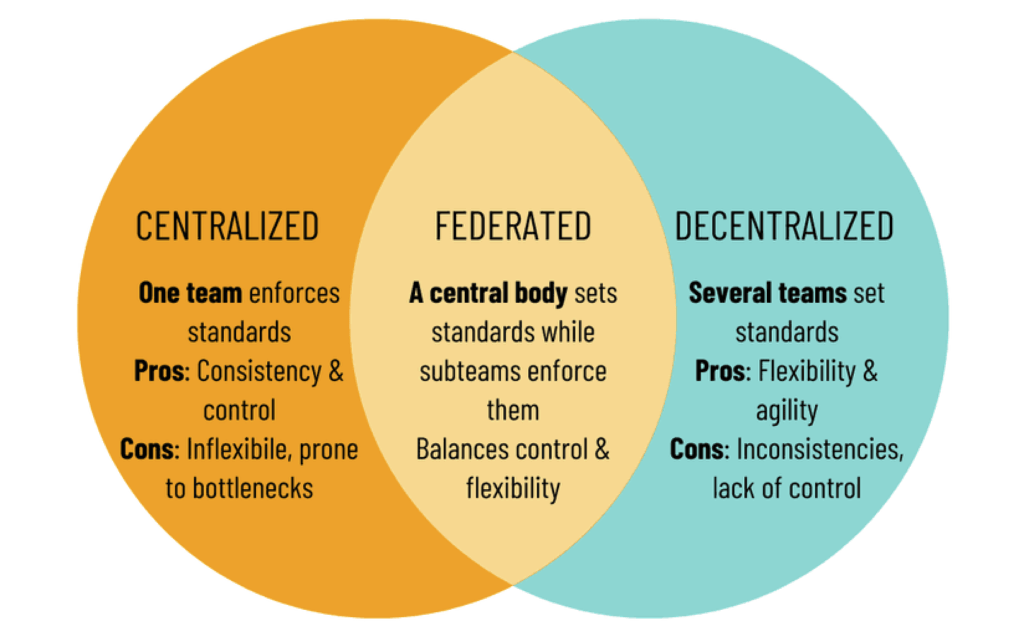
Having policies is one thing; having clear ownership of those policies is another. Organizations typically structure governance in one of two ways:
- Centralized. One team owns all risk, compliance, and policy decisions; consistent but can become a bottleneck
- Decentralized. Individual departments control their own rules; flexible for global organizations with local legal requirements, but creates coordination gaps if teams aren’t talking
Not in the study material, but found online by myself, a third way, being:
- Federated. A central team sets the overarching framework and non-negotiable baseline, while individual departments fill in and execute within it; gives you the consistency of centralized plus the flexibility of decentralized, but demands clear agreements on who decides what or the coordination gaps creep back in
Within that structure, data roles have specific meanings.
| Role | Responsibility |
|---|---|
| Data owner | Department lead; determines sensitivity, who gets access, what protection is required |
| Data controller | Decides why and how data is collected; primary legal responsibility |
| Data processor | Third party that handles data on the controller’s behalf (e.g. cloud storage, payroll provider) |
| Data custodian | Implements controls. Sets permissions, applies patches, maintains audit logs |
These aren’t just org chart labels. Under GDPR, the controller vs. processor distinction determines who gets fined when things go wrong.
Risk
Risk assessment starts with a simple equation:
Threat + Vulnerability applied to an asset = Risk.
You can assess risk qualitatively (Low / Medium / High, which is fast and subjective) or quantitatively (with actual numbers, which is more meticulous):
- Single Loss Expectancy (SLE): the cost of one incident
- Annualized Rate of Occurrence (ARO): how often it happens per year
- Annualized Loss Expectancy (ALE): SLE × ARO
That ALE number is what you bring to leadership when asking for budget. “We lose $50K a year on average from this risk” is a lot more convincing than “this feels risky.”
Every risk also needs an owner (someone responsible for tracking and addressing it) and a documented threshold (how bad does it have to get before we act?). You also want to track Key Risk Indicators (KRIs), i.e. early warning signals that a risk is getting worse. A sudden spike in failed login attempts, for example, is a KRI for a potential brute force attack.
Risk tolerance vs. risk appetite
These two are easy to confuse:
- Risk appetite is strategic: how much risk is the organization willing to take overall to achieve its goals?
- Risk tolerance is tactical: what are the specific limits per domain or department?
A hospital might have zero appetite for anything that could expose patient records, which translates to zero tolerance for weak access controls on clinical systems. A game studio might accept some performance bugs in early access but still have low tolerance for payment data exposure. They operate at different levels of abstraction.
Handling risk
When you’ve identified and analyzed a risk, you have four options:
- Mitigate. Reduce the likelihood or impact (add MFA, patch the software)
- Transfer. Shift the financial burden (cyber insurance, outsourcing)
- Avoid. Don’t do the thing that creates the risk
- Accept. Consciously decide to live with it; document it and get it approved
Exceptions to policy exist too, but they should be rare, time-bound, and always written down.
Business Impact Analysis (BIA)
BIA answers the question: if this breaks, how bad is it and how fast do we need it back?
Key metrics:
| Metric | What it measures |
|---|---|
| Recovery Time Objective (RTO) | Maximum acceptable downtime before systems must be back |
| Recovery Point Objective (RPO) | Maximum acceptable data loss, measured in time |
| Mean Time to Repair (MTTR) | Average time to restore service after an incident |
| Mean Time Between Failures (MTBF) | Average reliability; higher is better |
BIA is done before you build continuity or disaster recovery plans. It’s how you know which systems to restore first when ransomware hits both your billing platform and your internal reporting server at the same time.
Vendor risk and legal agreements
Third-party vendors extend your attack surface. Their breach can become your headline. Before you sign anything:
- Send a security questionnaire. Encryption practices, patching cadence, incident response plan, previous breaches
- Request audit reports and certifications (ISO 27001, SOC 2)
- Include a right-to-audit clause in the contract
- Map their dependencies. A vendor’s insecure sub-processor is your supply chain risk
Before any active testing (pen test or audit), both parties also need to agree on rules of engagement: scope, timing, what’s off-limits, how results get reported, and who gets notified. Without this, a tester could accidentally crash production systems during business hours. Same applies to audits: the auditor needs to know exactly what they can access and what evidence to expect.
The paper trail matters at least just as much.
| Document | Purpose |
|---|---|
| Service Level Agreement (SLA) | Defines uptime, response times, and penalties for failure |
| Memorandum of Understanding (MOU) | Non-binding intent document; used before a formal contract |
| Master Service Agreement (MSA) | Governs the long-term relationship; one umbrella contract |
| Statement of Work (SOW) | Specific scope, deliverables, and timelines for one engagement |
Compliance and privacy
Compliance means proving you follow the rules, not just following them. Internal reports catch problems early; external reports go to regulators, partners, or auditors as formal evidence. Not complying can mean fines, lawsuits, lost contracts, and reputation damage that outlasts all of the above.
The compliance process has a few steps worth knowing by name:
- Due diligence. Understand which laws and standards apply to your business
- Due care. Actually implement the controls and make them work
- Attestation. Employees sign to confirm they’ve read and agreed to follow policies; not just sending an email and hoping they read it
- Audits. Internal audits catch issues early; external audits provide independent verification and carry more weight with regulators
Privacy laws add even more dimensions. A few things to keep in mind:
- Data subject. The person the data is about; they have rights to access, correct, and delete it
- Controller. Decides why and how data is collected; carries primary responsibility
- Processor. Handles the data on behalf of the controller (e.g. your cloud storage provider)
- Right to be forgotten. Under GDPR, individuals can request deletion of their data when it’s no longer needed
One more practical obligation: data inventory and retention. Know what data you hold, where it lives, who can access it, and how long you keep it. Once the business or legal need is gone, delete it. Holding data “just in case” adds risk and violates most privacy laws.
The core rule: your organization is a custodian of data, not an owner. Act like it.
Security testing and user awareness
Two important concepts are yet to be defined.
Penetration testing
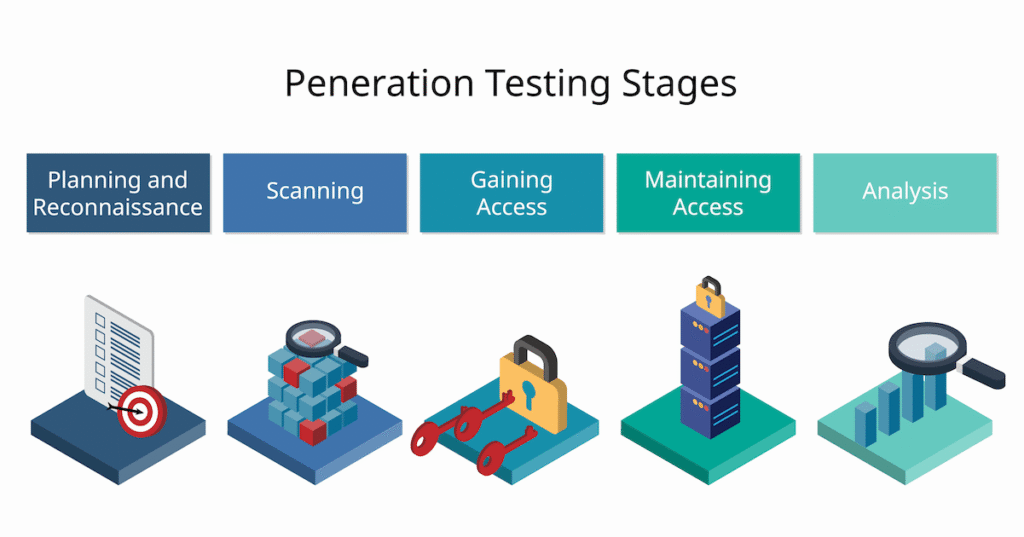
Pen testers think like attackers. Before they start, they do reconnaissance:
- Passive recon. Publicly available information (OSINT, LinkedIn, DNS records); completely undetectable
- Active recon. Direct interaction with systems (port scanning, service enumeration); more useful, but leaves traces
Test types by knowledge level:
| Type | What the tester knows |
|---|---|
| Black box | Nothing: simulates a real external attacker |
| Grey box | Partial info: e.g. the internal network range |
| White box | Full access: architecture, credentials, source code |
Phishing and awareness
Phishing is already in your inbox. The goal isn’t just for IT to handle it; it’s for every employee to be a detection layer. Signs to watch for: mismatched sender addresses, urgency, unusual requests, suspicious links. Always use the ‘Report Phishing’ button, follow your company’s process, never forward the email to colleagues, and if you clicked say so immediately.
User training isn’t a checkbox. It works when people understand why the rules exist, when training is built around real threats the org faces, and when failing a phishing simulation is treated as a coaching moment rather than a punishment. Operational Security (OPSEC) is part of this too: even a LinkedIn post about an internal tool gives attackers something to work with.
Bottom line
Personally, I find this one of the most boring subjects in cyber security, but it’s very important.
Governance and compliance feel administrative until you’re the one explaining to regulators why customer data was exposed. The frameworks, policies, and processes covered in this module are the difference between a security program that’s just tooling and one that actually holds up under scrutiny.
Next
Now we ‘only’ need to pass the exam to get the certificate!
Afterwards, one week of rest, and then I’m hoping to get my TryHackMe SEC1 and tell you about it.