Introduction
A few weeks back I built a throwaway lab: an attacker box and a couple of disposable targets, all from a make up. That solved the targets problem, but I wanted more for the Kali box itself. So I gave it the same treatment: one repo, one command, a Kali workstation I can burn down and rebuild without a second thought.
This post is what that code does, why Kali lives in a VM instead of me struggling with my Mac, and the one thing it still can’t do.
Why not just run it on the Mac
I’ve tried to us my Mac as my attacking machine. Install nmap, sqlmap, a Python or two with Homebrew,etc. It holds up until the first tool that only ships for Linux, or the first one that wants to touch an interface macOS won’t hand over. Half of offensive tooling assumes Linux and misbehaves off it. The rest wants into the network stack, where macOS is strict about what gets access; you spend more time clearing permission prompts and code-signing than testing anything.
Then there’s something else that is also important. The moment you run something you don’t fully understand yet against a target, you want it nowhere near the machine holding your browser sessions, your SSH keys, and your bank tabs. A VM draws that line for you. Compromise it, wreck it, fill it with junk from a sketchy PoC, and the cost is a rebuild.
A hand-built VM has one flaw: it becomes precious. You stop wanting to break the thing you spent an afternoon configuring. Automating the build takes that hesitation away.
What Kali brings
Kali Linux is a Debian-based distro that ships with the offensive toolset already curated and maintained: recon, exploitation, password attacks, web testing, wireless, the lot. You could assemble the same tools by hand on any Linux box; you’d just be signing up to package and update a few hundred of them yourself. Kali does that maintenance for you, which is exactly the kind of work I’d rather not repeat. On Apple Silicon it runs natively as aarch64, so there’s no x86 emulator crawling underneath.
What the code does
The interface is one command:
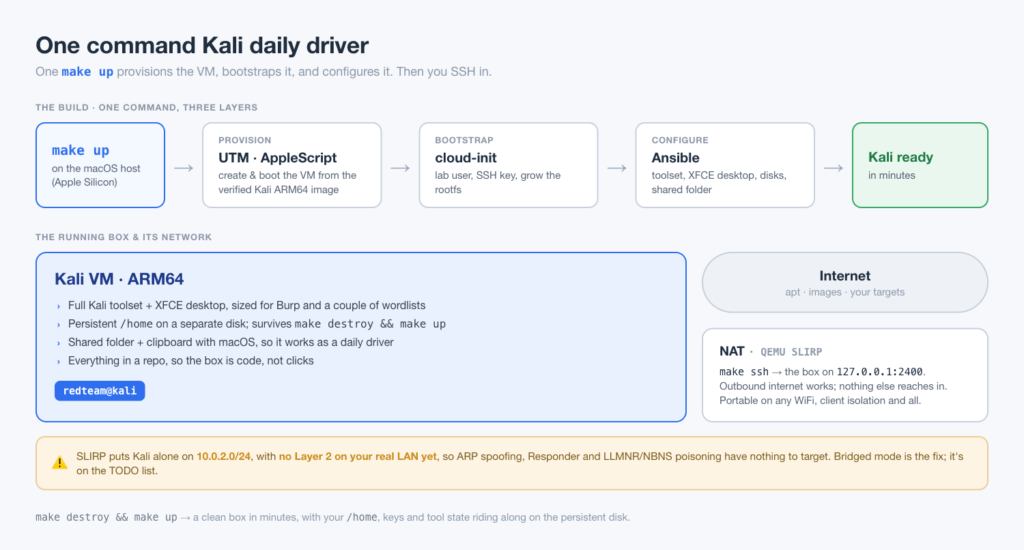
make upBehind it sits the same three-layer pattern I use for my Hetzner VPS builds: a provisioner creates the machine, cloud-init bootstraps it on first boot, and Ansible configures it. The twist is the provisioner. Instead of a cloud API it drives UTM, the free, open-source QEMU front-end for macOS, through its AppleScript interface.
make up runs a preflight check, downloads and SHA-verifies the Kali cloud image, creates and boots the VM, waits for SSH, then hands off to Ansible for the toolset, the desktop, and the rest.
Tech stack
| Layer | Choice | Why |
|---|---|---|
| Host | MacBook, Apple Silicon | What I own |
| Hypervisor | UTM (QEMU) | Free, open source, native ARM64 |
| Provisioning | UTM AppleScript + make | The role a cloud API plays elsewhere |
| Bootstrap | cloud-init NoCloud seed | First-boot user, SSH key, rootfs grow |
| Configuration | Ansible | Idempotent, re-runnable on every change |
| Guest | Kali genericcloud ARM64 | Cloud-init support plus the Kali toolset |
Key features
- ✅ One command from nothing to a configured Kali desktop
- ✅ Disposable:
make destroy && make upfor a clean box in minutes - ✅ Persistent data disk that survives the teardown, so
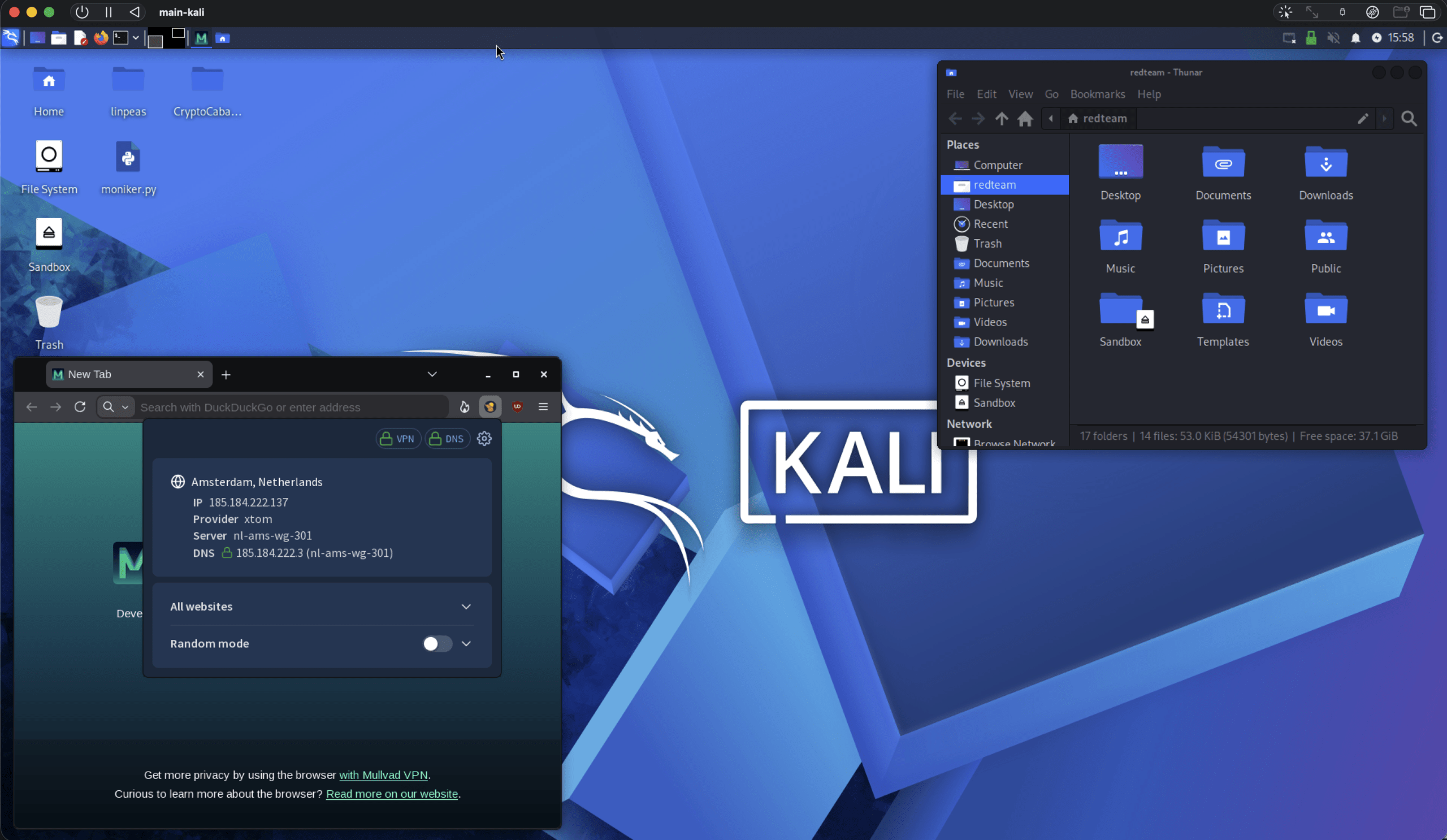
/homeand tool state carry over - ✅ Shared folder and clipboard with macOS, so it works as a daily driver, not just an SSH target
- ✅ ARM64-native from the hypervisor to the guest, no emulation tax
- ✅ Everything in a repo, so the box is code, not clicks
Settings
A throwaway box you SSH into is easy. A box you live in needs more to feel right, and those are the settings I reach for most. Everything lives in a gitignored lab.conf:
| Setting | What it buys you |
|---|---|
KALI_TOOLSET | curated for a lean headless box, up to large for everything Kali ships |
KEEP_HOME | Make the persistent disk your /home, so dotfiles, keys and shell history outlive a rebuild |
SHARED_DIR | A host folder mounted live in the guest, kept outside the repo so engagement files never hit a git tree |
CLIPBOARD | SPICE copy/paste between macOS and the desktop |
MULLVAD | Optionally pull in the Mullvad VPN and Browser from their own signed apt repo |
VM_CPU / VM_RAM | Size it for Burp and a couple of wordlists without it ever feeling tight |
The persistence one is my favourite. make destroy && make up gives me a fresh box, but my home directory, keys and tool config ride along on a separate disk, so “clean slate” never means “reconfigure everything again.”
Networking
The box has a single NIC in UTM’s emulated mode, which is QEMU’s SLIRP user-mode networking. The guest gets outbound internet and a single SSH port-forward on 127.0.0.1:2400; nothing else reaches in. That makes it portable and quiet: it behaves the same on my home network as it does on café WiFi with client isolation.
The tradeoff is that SLIRP puts Kali on a private island. It has no Layer 2 presence on my real LAN, so the attacks that depend on being a genuine neighbor have nothing to work with: ARP spoofing, Responder, LLMNR and NBNS poisoning. Bridged mode would fix that by handing the guest its own DHCP lease on the physical network. I tried; I couldn’t get it working on this setup, and rather than ship something half-broken I left NAT as the only mode and a TODO in the README. When I need Layer 2 practice in the meantime, a second VM on a host-only segment gives me a private wire where those tools just work.
Quick start
cp lab.conf.example lab.conf
make up
make ssh kali
First run takes a few minutes, most of it the image download and the toolset install. After that a rebuild is quick, and the speed is what I wanted: a box I can break without flinching.
Make sure to get your hands on the code here.
Next
Next week I’m going one step further, building a two VM setup, anonymizing everything, and as always deploying and destroying it with a single command.