
Introduction
I’ve been working through the CompTIA Security+ curriculum and the second module, Cybersecurity Threats and Defense, covers more ground than I expected. It starts with the attack landscape and works its way through malware, physical intrusions, network exploitation, application vulnerabilities, detection techniques, defense architecture, and data security.
Although it has a lot of overlap with the Google Cybersecurity series I did earlier this year, there was quite some new stuff in there, and I find it interesting nevertheless.
Here’s my attempt to distill it into something useful.
The attack surface is wider than most think
The real attack surface breaks down into six categories, and they don’t all live in one particular layer.
- Malware attacks: software designed to harm, spy, or take control
- Physical attacks: hands-on intrusions, cloned access badges, environmental sabotage
- Network attacks: flooding, traffic interception, DNS manipulation
- Application attacks: exploiting code flaws like SQL injection or buffer overflows
- Cryptographic attacks: breaking weak encryption or hashing algorithms
- Password attacks: brute force, credential spraying, replay of stolen credentials
What unifies all of them is this: most attacks succeed because of outdated systems, weak passwords, or untrained users. The technical complexity of the attack is secondary to the size of the opening it walks through.
Malware
Viruses and worms are the entry-level material. A virus attaches itself to a legitimate file and waits to be executed; a worm spreads itself across networks without any help from the user. Ransomware, the WannaCry variety for instance, encrypts your files and demands payment in cryptocurrency to restore access. These are well-documented and most people have at least heard of them.
The more interesting territory is the stuff that’s designed to be invisible.
Keyloggers
Sit in the background recording every keystroke: passwords, credit card numbers, messages, everything you type. They get in through fake software installers or email attachments, and once installed, they just quietly collect. Keyloggers are sometimes marketed for legitimate uses like parental monitoring or employee oversight, but tools like Phoenix are purpose-built criminal malware sold on underground markets. The countermeasure is straightforward: use a password manager so you’re typing passwords less, and don’t install software from untrusted sources.
Logic bombs
Pieces of dormant code planted inside otherwise legitimate programs. They don’t do anything until a trigger condition fires: a specific date, a deleted user account, a threshold of failed logins. There are documented cases where a disgruntled employee plant these bombs, wiping out company data on a moment of their choosing. Because they live inside legitimate code and don’t execute until triggered, they’re genuinely difficult to detect in advance.
Rootkits
Rootkits give an attacker admin-level, or root-level, access to a system and then actively hide themselves. Not just from users; from the operating system. The kernel-level ones are particularly nasty because the very tools you’d use to detect them can be subverted by the rootkit itself. The Sony BMG scandal in 2005 is a useful example: music CDs silently installed rootkit-style software on Windows machines as part of a copy protection scheme. It opened up security vulnerabilities and Sony ended up recalling millions of discs. Specialized tools like GMER, Rootkit Revealer, and chkrootkit exist to hunt for these because standard antivirus often misses them.
Trojans
Look like something useful, a free app, a software patch, a game, but carry a hidden payload. Emotet is the textbook case: it started as a banking trojan stealing credentials, evolved into a full malware distribution platform, and helped spread ransomware across thousands of organizations worldwide. Trojans don’t self-replicate; you have to install them. That’s why phishing and fake download sites remain so effective as delivery mechanisms.
Physical attack vectors
The assumption in software-heavy roles is that security is only a digital problem. It’s much more than that.
Brute force entry
Brute force entry in the physical sense means someone forcing their way past a door, tailgating an authorized employee through a badge-controlled entrance, or social engineering their way past a front desk. Incidents in 2005 – 2007 in Chicago involved attackers simply breaking into a data center and physically stealing servers. No hacking tools required. The defense is obvious but often neglected: layered physical controls, cameras, guards, and biometric access where the risk warrants it.
RFID cloning
RFID cloning is subtler and increasingly relevant. Most office access badges use Radio Frequency Identification (RFID) chips. When you hold a badge up to a reader, it broadcasts a signal. An attacker with a Proxmark 3 or a Flipper Zero can silently capture that signal by standing close to you in an elevator or a conference hallway, then clone it onto a blank card. They now walk into your building looking exactly like they belong there. The countermeasures: smart cards that generate a one-time code per scan (so a cloned static ID doesn’t work), multi-factor access for sensitive areas, and RFID-blocking sleeves for badges.
Environmental attacks
Environmental attacks are the ones that don’t look like attacks at all. Pulling a fire alarm to evacuate a building and then walking in while it’s empty. Disabling the air conditioning in a server room overnight so the hardware overheats and crashes by morning. These cause real damage and are difficult to attribute quickly. The defenses are boring infrastructure: temperature and humidity sensors, uninterruptible power supply (UPS) backup systems, cameras in server rooms, and a solid offsite backup strategy so that even if equipment is destroyed or stolen, you’re not starting from zero.
Network attacks
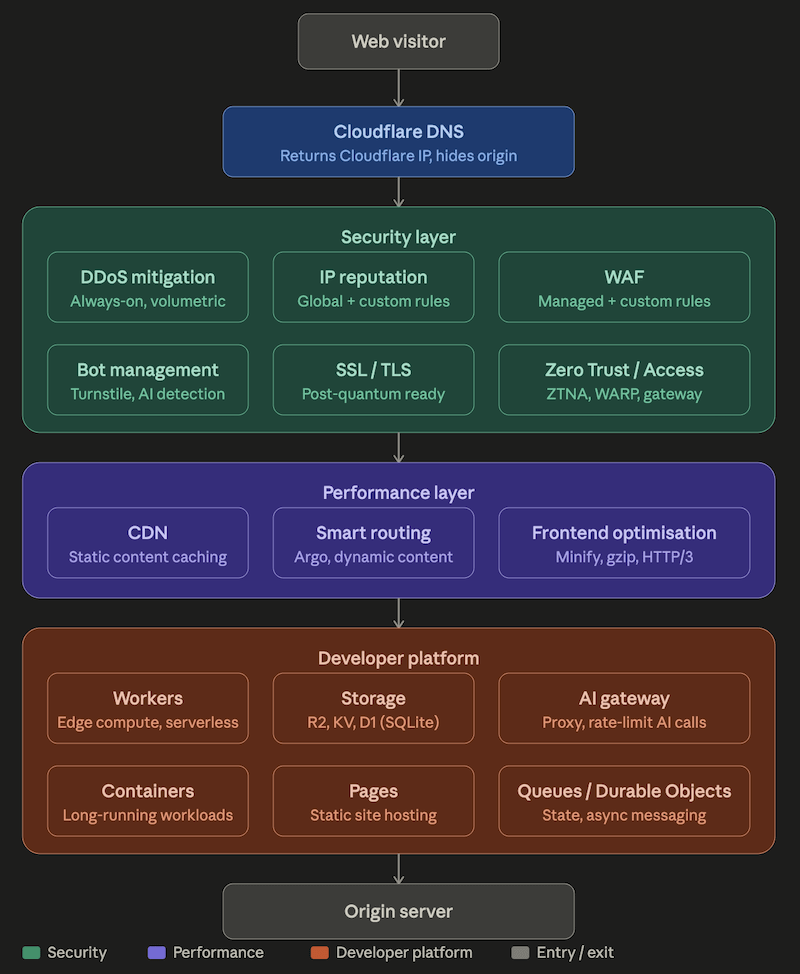
The Distributed Denial of Service (DDoS) attack is well-known: flood a server with traffic from a botnet of compromised machines until it can’t respond to legitimate requests. The amplified variant is more interesting. An attacker sends a small DNS query (around 60 bytes) with a spoofed source address pointing at the victim. The DNS server responds with a much larger reply (4,000 bytes or more) to the spoofed address. Multiply that across thousands of servers and the victim receives a flood far larger than what the attacker actually sent. Services like Cloudflare and AWS Shield exist largely to absorb this kind of traffic before it reaches your infrastructure.
Man-in-the-Middle (MITM) attacks
Man-in-the-Middle (MITM) attacks sit between you and whatever you’re communicating with, intercepting or modifying traffic in both directions. The classic setup involves a fake WiFi hotspot with a name indistinguishable from the real one. You connect, your traffic flows through the attacker’s machine, and they can read or tamper with anything that isn’t encrypted end-to-end. Tools like Ettercap and Bettercap make this straightforward to execute. HTTPS and a Virtual Private Network (VPN) are the main defenses.
Credential replay
Credential replay is a follow-on attack that often comes after a data breach. An attacker gets hold of leaked username/password combinations and systematically tries them across other services, banking on the fact that most people reuse passwords. Hydra and Burp Suite can automate this against hundreds of sites in minutes. This is why multi-factor authentication (MFA) matters so much: even if the password is compromised, the attacker still can’t get in without the second factor.
DNS spoofing
DNS spoofing poisons the Domain Name System so that when you type a legitimate address, you’re directed to a fake one. You think you’re at your bank; you’re actually handing your credentials to an attacker’s phishing page. Domain Name System Security Extensions (DNSSEC) adds cryptographic signatures to DNS records so clients can verify they haven’t been tampered with.
Wireless attacks
Wireless networks bring their own layer. The evil twin attack uses a rogue access point named identically to a real one. Your device connects, the attacker sees everything. The de-authentication attack forces devices off the real network so they automatically reconnect to the fake one. Both are trivial with off-the-shelf hardware. WPA3 encryption, VPN use on public networks, and disabling automatic reconnection to open networks all help.
Application attacks
Firewalls and network monitoring don’t help when the attack arrives as a perfectly normal HTTP request. Application-level attacks exploit the way software handles user input.
SQL injection
SQL injection is the classic. Most web applications build database queries by combining template strings with user input. If that input isn’t sanitized, an attacker can alter the query’s logic entirely. The standard example: a login form builds SELECT * FROM users WHERE username = 'x' AND password = 'y'. Submit ' OR 1=1 -- as the username and the query becomes unconditionally true. You’re authenticated without a valid password. Parameterized queries, where input is passed separately from the query structure, eliminate this entirely.
Cross-site scripting (XSS)
Cross-site scripting injects malicious JavaScript into a page, usually via a comment field or form. When other users load the page, the script runs in their browser. It can steal session cookies, capture keystrokes, or silently redirect the user to a phishing page. A Content Security Policy (CSP) header restricts which scripts are permitted to execute, limiting what injected code can do.
Buffer overflows
Buffer overflows are lower-level but still relevant in legacy code bases and embedded systems. If a program allocates a fixed-size memory buffer and doesn’t validate input length, an attacker can write past the buffer’s boundary into adjacent memory. With a carefully crafted payload, they can overwrite a return address and redirect the program’s execution flow to arbitrary code. Bounds checking and memory-safe languages go a long way toward preventing this class of attack.
Privilege escalation
Privilege escalation is the follow-up move after initial access. An attacker who gets into a low-privilege account then exploits a vulnerability to gain higher permissions, eventually reaching admin or root. Least-privilege principles, where accounts only have the permissions they actually need, limit how far this can go.
Identifying malicious activity
Detection doesn’t happen automatically. Knowing what normal looks like is a prerequisite for spotting what isn’t.
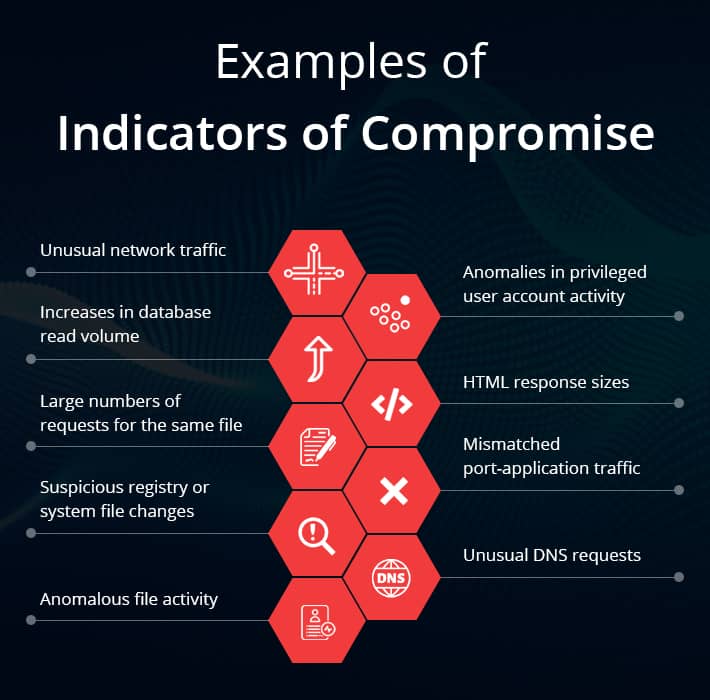
Indicators of Compromise (IoC) come in three flavors:
- Behavioral. Processes spawning unexpected children, logins at unusual hours, accounts accessing resources they’ve never touched
- Host. New scheduled tasks, modified system binaries, disabled logging
- Network. Unexpected outbound connections, unusual DNS query patterns, large data transfers to external destinations
None of these alone is definitive, but combinations narrow things down quickly. Different companies have different categories/flavors.
This is the reason Security Information and Event Management (SIEM) systems exist. They aggregate logs from endpoints, network devices, and identity systems in one place, correlate events across sources, and surface anomalies that no single log would reveal. An attacker who evades endpoint detection might still trip a network anomaly alert, or generate an identity event when they try to escalate privileges. Catching them requires watching all three layers simultaneously.
Defense architecture and controls
A few principles from the defense section that translate directly to infrastructure work.
Zero trust
Zero trust means treating every request as potentially hostile regardless of where it originates. Internal network traffic is not inherently trustworthy just because it didn’t come from the internet. Every connection should be authenticated and authorized explicitly.
Network segmentation
Network segmentation divides a network into zones with controlled boundaries between them. Medical devices on their own segment, staff workstations on another, guest WiFi on a third. If an attacker gets into one zone, they don’t automatically have access to everything else. VLANs and firewall rules enforce the boundaries; the principle is containment.
Jump servers
Jump servers, also called bastion hosts, are hardened intermediaries for administrative access to sensitive systems. Rather than SSH-ing directly into a production server, an administrator connects to the jump server first, and the jump server provides the onward connection. All access is logged in one place, the blast radius of a compromised credential is contained, and direct exposure of critical systems to the network is eliminated.
System hardening
System hardening is unglamorous but high-impact: disable services that aren’t needed, apply the principle of least privilege, keep software patched, and audit configurations regularly. The gap between “default install” and “hardened install” is where a lot of real world compromises happen.
Port security and access control at the network edge are handled through standards like 802.1X, which requires devices to authenticate before a network port opens. The authentication involves three parties:
- The supplicant, i.e. the device trying to connect
- The authenticator, i.e. the switch or access point
- The authentication server, i.e. the RADIUS server that makes the actual pass/fail decision
Extensible Authentication Protocol (EAP) handles the actual credential exchange, and it supports everything from username/password to certificates to smart cards depending on the sensitivity of the environment.
Data security
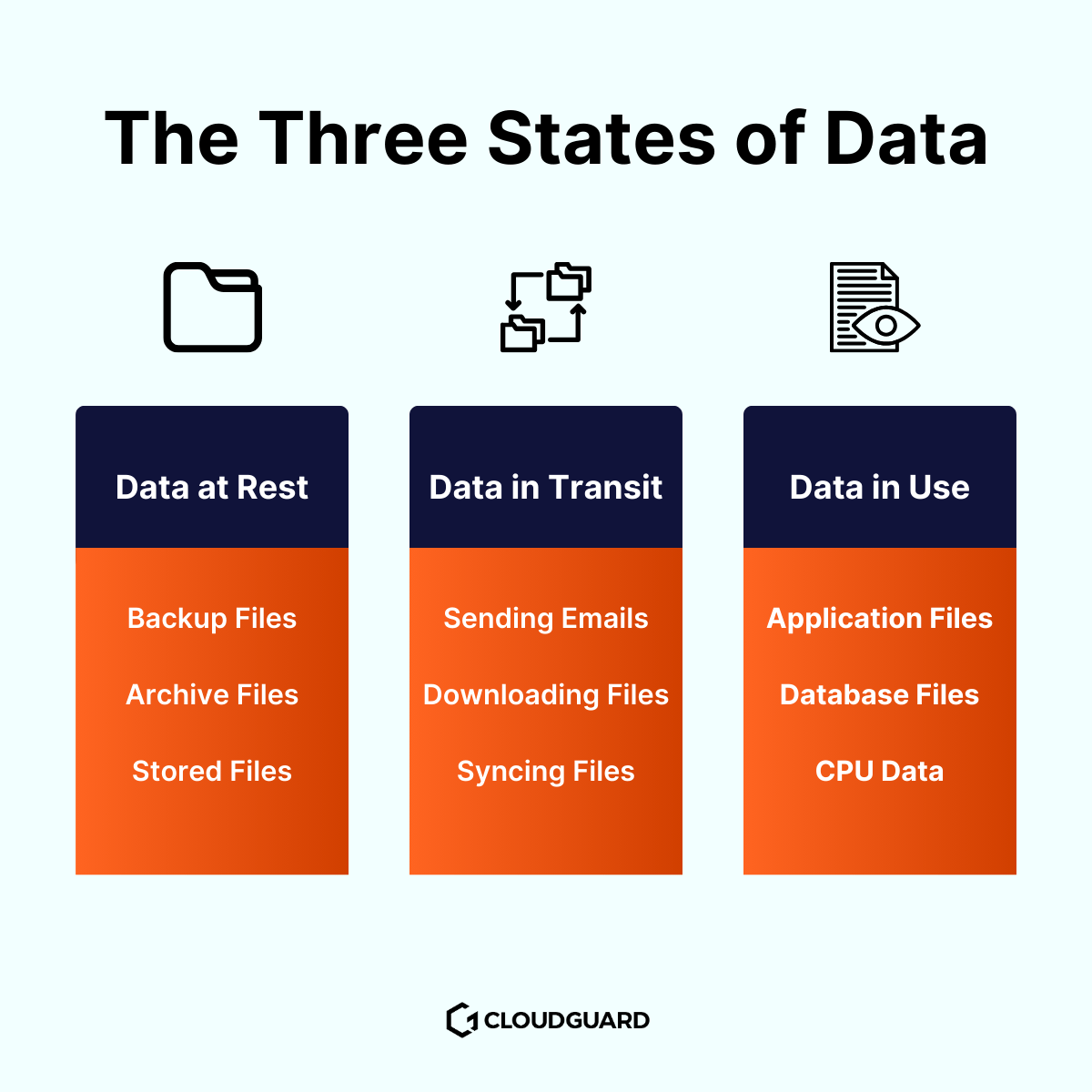
Summary of the (well known) three three states of data.
Data at rest
Data at rest is stored and not moving. Encryption at rest means that if someone steals the storage medium, the data is useless without the key. Access controls determine who can read it at all.
Data in transit
Data in transit is moving across a network. Secure protocols like HTTPS, SFTP, and VPN tunnels (using Transport Layer Security, or TLS) encrypt the data in motion so interception yields nothing readable.
Data in use
Data in use is the tricky one. It’s actively being opened, edited, or processed, which typically means it’s decrypted. The protection here shifts to endpoint security, monitoring who accesses what, and ensuring the device doing the work is itself trustworthy.
Data classification gives every piece of data a label that determines how it should be handled:
- Public. Safe to share externally)
- Internal. Wwithin the organization only)
- Confidential. Restricted access, audit trail required
- Restricted/classified. Tightest controls, often regulated by law)
Without classification, people make inconsistent decisions about what’s safe to share and what isn’t.
Data sovereignty
Data sovereignty is the geopolitical aspect of data. Data stored in a given country falls under that country’s laws, regardless of where the organization collecting it is based. A Dutch company storing data on US-based cloud infrastructure is subject to US legal demands for that data. GDPR requires that EU citizen data be handled under EU rules, which creates real constraints on cloud region selection. This isn’t just a legal team concern; it directly affects architecture decisions about where workloads run and where data is stored.
Bottom line
The main thing this course made clear is that the attack surface is multi-layered and there’s no single control that covers it. Physical access, network traffic, application code, authentication flows, data storage location; all of it is part of the threat model. The defenses that work are similarly layered:
- Segment the network
- Apply least privilege everywhere
- Encrypt data in all three states
- Authenticate explicitly rather than by assumption
- Monitor for anomalies across all three detection layers simultaneously
Next
All in all this was quite a long post. I’ll do my best to finish up the material for the next course in the Security+ path, Cybersecurity Operations and Controls.