
Introduction
Back in May I built a self hosted cybersecurity dashboard: a stack of containers that pulls security news from a handful of feeds I trust, de-duplicates the flood of overlapping headlines, scores each story, and rolls everything up into a live DEFCON-style threat level. It lives on my server and I like it. The one thing it can’t do is sit in my pocket and buzz when the threat landscape gets spicy. So I put the same brain into a phone.
Before I go further, the same disclosure as last time. The whole app is vibe-coded with Claude. Native mobile development is far from my cup of tea; I’m a platform engineer, transitioning to cyber professional, I live in Linux, Docker, and Infrastructure as Code, and Swift is not a language I reach for. What I care about here is the cybersecurity angle and a bit of automation: can I take a scoring pipeline I already trust and get it running on-device, offline, with no backend? I knew what I wanted and enough to steer the architecture, and I let the model do the coding.
On a blog that also covers AI, pretending otherwise would be silly.
Challenge
The dashboard’s whole value is the pipeline: fetch, de-duplicate, score, decay, and surface a single number. On the server that pipeline is Python talking to PostgreSQL and Redis. None of that exists on a phone, and I did not want it to. No server round-trips, no account, no analytics, nothing leaving the device except the requests to the public feeds themselves. The threat scoring had to run locally on whatever the phone last fetched, and it had to keep behaving sensibly even when iOS throttles background work into oblivion.
Solution
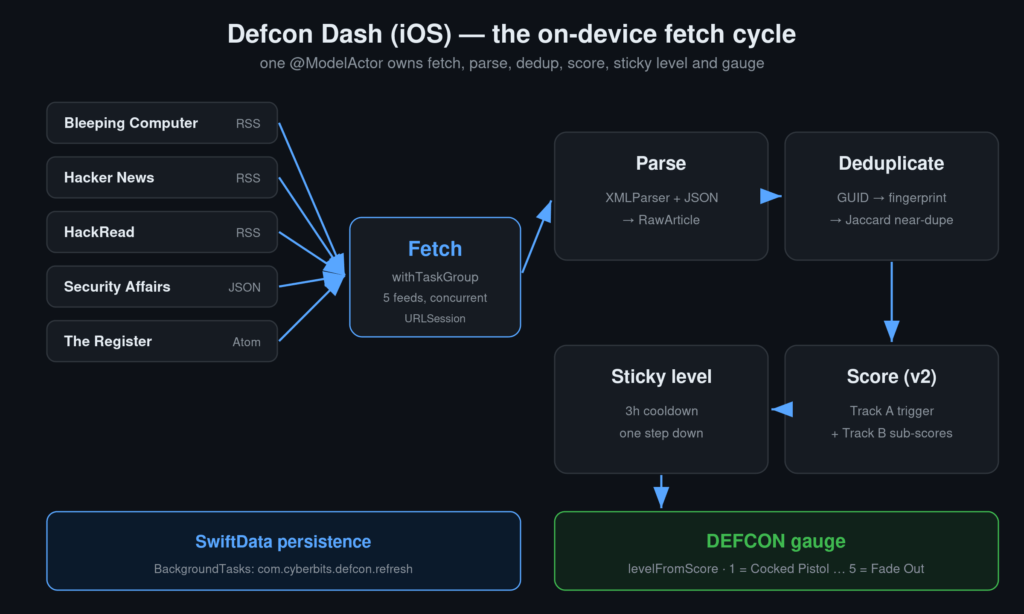
A native SwiftUI app for iOS 17 and up, iPhone and iPad, that ports the Python scoring pipeline to Swift and runs the entire thing on-device. It fetches five feeds concurrently, de-duplicates across them, scores each article, decays the global level over a rolling window, and draws a speedometer gauge. Persistence is SwiftData, Apple’s local store; background refresh rides on BackgroundTasks; and threat-level rises fire a local notification.
Tech stack
| Concern | Choice | Why |
|---|---|---|
| Language / UI | Swift 5.9 + SwiftUI | Native, declarative, iOS 17+ |
| Persistence | SwiftData | On-device store, no server |
| Background refresh | BackgroundTasks | Periodic fetch when the OS allows |
| Notifications | UserNotifications | Local alerts on threat-level rise |
| Networking | URLSession | Concurrent feed fetches, no dependencies |
| Project generation | XcodeGen | Project defined in a YAML file, not a binary blob |
There are no third-party libraries. No networking framework, no charting library, no dependency manager. The gauge is hand-drawn, the feeds are parsed with Apple’s own XMLParser, and the whole thing compiles against the SDK and nothing else. For a security app I like that the supply chain is Apple and me.
Key features
- ✅ Fully on-device: no account, no backend, no analytics, no tracking
- ✅ Five feeds fetched concurrently and de-duplicated across sources
- ✅ Live DEFCON gauge with a 24-hour trend sparkline
- ✅ Tap a severity bar to filter the article feed to that level
- ✅ Background refresh, so the dashboard is current the moment you open it
- ✅ Zero third-party dependencies
Internals
The heart of the app is FetchCoordinator, a SwiftData @ModelActor. An actor in Swift is a reference type that serialises access to its own state, so there is no way for two refresh cycles to stomp on the database at once. One runFetchCycle() call does the whole dance: snapshot what’s already stored, fetch every feed, de-duplicate, score, trim, roll up the global level, apply hysteresis, and emit notifications.
The five feeds are fetched in parallel with a task group, which is the Swift concurrency primitive for “run these N things at once and collect the results”:
await withTaskGroup(of: (FeedSource, [RawArticle]).self) { group in
    for source in FeedSource.allCases {
        group.addTask { (source, await Self.fetch(source: source)) }
    }
    for await (source, batch) in group {
        perSource[source.rawValue] = batch.count
        allRaw.append(contentsOf: batch)
    }
}
Four of the sources are RSS or Atom XML; Security Affairs is served as JSON from a WordPress REST API. The parser branches on the source and hands back a uniform RawArticle either way.
De-duplication
The server version leans on Redis for its fingerprint set. On-device there’s no Redis, so the same idea runs in memory each cycle. The check is layered cheapest-first: an exact match on the feed’s GUID (have I stored this already?), then a fingerprint of the normalized title, then a Jaccard similarity check over tokenized titles to catch the same story told by two outlets with different words.
The Jaccard pass is the expensive one, so it only runs when the cheap checks pass, and the corpus of recent titles is tokenized once per cycle rather than per candidate. That single change took the tokenizer call count from roughly twenty-two thousand down to a few hundred. Reproducing a Redis-backed pipeline in a phone’s memory budget is exactly the kind of constraint that makes you tokenise once.
Scoring
This is the part I ported most carefully, because it’s the part that decides what number you see. Each article gets a per-article score, and then the global level is a roll-up across a rolling window.
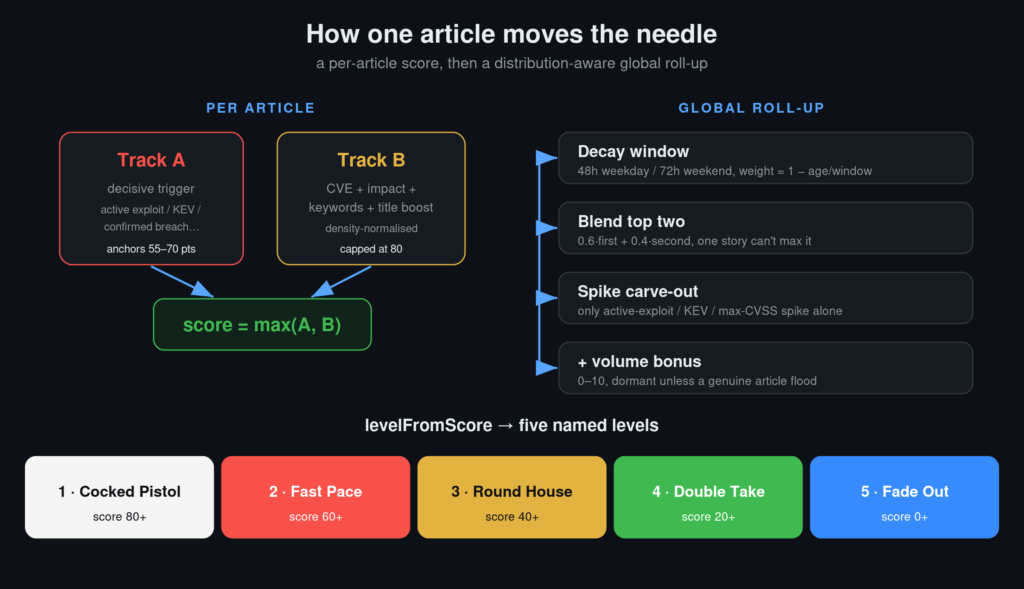
Per article, there are two tracks. Track A fires on a decisive trigger: active exploitation, a CISA KEV addition, a confirmed breach, an APT campaign, and so on. A trigger anchors the score at a meaningful baseline (55 to 70 points) regardless of how quietly the headline is phrased. Track B is the stacking approach: a Common Vulnerability Scoring System (CVSS) sub-score pulled out of the text with regex, an impact sub-score (“millions of users”, “critical infrastructure”), a keyword-density sub-score, and a title boost, all capped at 80. The article’s final score is the higher of the two.
The global roll-up is where I fixed a flaw from v1. In the first version a single loud article could peg the gauge on its own. v2 weights every article in the window by age (a 48-hour decay on weekdays, 72 on weekends, since weekends are quieter), then blends the top two:
blend = blendW1 * scored[0].ws + blendW2 * scored[1].ws // 0.6 and 0.4So one story can no longer max the needle by itself; it needs a second serious story to back it up. The exception is a deliberate carve-out: decisive triggers, active exploitation, a KEV addition, or a maximum-severity CVSS, are allowed to spike the gauge alone, because that’s the entire point of a DEFCON alert. On top of that sits a volume bonus of up to ten points, floored so a single new article after de-duplication doesn’t read as a surge. A final levelFromScore maps the number to one of five named levels, from DEFCON 5 (Fade Out) up to DEFCON 1 (Cocked Pistol). Remember the scale is inverted: 1 is the worst.
Sticky level
News is bursty. Without smoothing, the level would snap up and immediately drop the moment the window moved on. StickyLevel is a small state machine that tracks a floor of the most-severe recent level with a three-hour cooldown. Rises apply at once; falls are gated to one step per cooldown, and only if there’s still an article in the window whose own score justifies that floor. A real DEFCON 2 can’t vanish inside an hour just because the news cycle blinked.
This decay runs even without networking. When iOS declines to grant a background fetch, the app re-runs the roll-up and sticky steps on launch and when it returns to the foreground, so the displayed level keeps decaying instead of freezing at whatever it was three days ago.
Privacy
Because everything runs on the phone, the privacy story is short. There is no account and no signup. Nothing is sent anywhere except the HTTP requests to the five public feeds. There is no analytics library because there are no libraries at all. In App Store privacy terms this is “Data Not Collected” across every category, and that’s not marketing; it’s what the code does.
Build and run
The Xcode project isn’t committed as a binary; it’s generated from a project.yml with XcodeGen, so the repo stays diff-friendly. Install it with Homebrew and generate:
brew install xcodegen
xcodegen generate
open CyberbitsDefcon.xcodeproj
From there it’s the standard Run button on a simulator or device. There’s a small XCTest suite covering the scorer, the de-duplicator, the feed parser, and the triggers, which is where I regression-test any change to scoring behaviour.
One caveat
Not yet on the App Store. The app is feature-complete and builds/runs on a device, but the actual App Store release (Apple Developer enrollment, code signing, screenshots, review submission) is still a TODO. It’s deferred for now given the time, effort, and cost involved, and will be done at a later date.
The code is the interesting part, and the repo is on GitHub under GPLv3 if you want to build it yourself.
Wrapping up
Was porting a perfectly good server dashboard to a phone necessary? No. But it forced me to strip the pipeline down to what runs without Redis, without Postgres, and without a network you can rely on, and the result is a self-contained little threat radar that fits in a pocket. I think it’s pretty cool, and although vibe-coded, I’m rather proud of it.
Next
Half my friends are on Android, and so is half the world. Next week I do the whole thing again in Kotlin and Jetpack Compose, keeping the scoring pipeline identical so the two apps agree on the threat level down to the point. “Same brain, different body” has a few sharp edges.