Introduction
I retired an old WordPress site last week. It had been running on my Virtual Private Server (VPS) for a while, and I was never fully confident it had been locked down properly (it was a temporary site to test some stuff for someone). So before I forgot about it entirely, I wanted an answer to one question: did anyone get in while it was up?
Instead of grinding through logs by hand, I pointed Claude Code at the box and said “go find hack-y things.” What followed was a proper little incident response exercise, a mild heart-attack over a password, and a reminder that the scariest looking finding is usually my own mistake.
Challenge
A VPS that has hosted a public WordPress site is a reasonable thing to be paranoid about. WordPress is the internet’s favorite punching bag; between plugin vulnerabilities, weak admin passwords, and XML-RPC abuse, a neglected install is a plausible entry point. If someone had popped the site, they wouldn’t have stopped at the container. They’d have tried to persist: a cron job, an extra SSH key, a hidden user, a crypto miner quietly eating my CPU.
So a real check has to go wider than WordPress. It has to look at the whole host: accounts, authentication logs, scheduled tasks, startup persistence, network listeners, running processes, file integrity, and the container layer. That’s the plan.
Did I lock myself out of root?
The box is deliberately hardened. Static SSH keys only, no password login, root login disabled; provisioned and split into a hardened host with the apps in containers the way I described in separation of concerns of VPS and Docker apps. Good for security, annoying for an audit, because a lot of the interesting evidence (the auth log, /root, other users’ files) needs root.
No problem, I thought, I’ll just hand over the sudo password. I pulled it straight from my OpenTofu state, where the provisioning secrets live:
tofu output -json login_credentials | jqPiped it into sudo. Rejected. “Incorrect password attempt.” Tried again, straight from the state file so there was no copy-paste error. Rejected again, on the very first attempt, so it wasn’t a lockout from too many tries. WTF.
That is the kind of thing that makes your stomach drop during a compromise review (or any time, for that fact). A sudo password that should work but doesn’t can be a sign that someone changed it. I’m getting back at this.
The way in via Docker
My ansible user couldn’t sudo, but it was a member of the docker group. That group is root equivalent, people hand it out like candy and so did I.
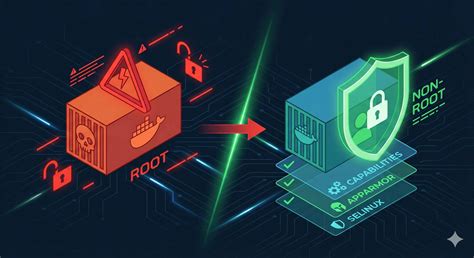
The Docker daemon runs as root. Anyone who can talk to its socket can ask it to run a container, and a container can mount the host’s entire filesystem. Mount / into a container and you can read and write every file on the machine as root, sudo password or not. That is what the group is for. Treat docker membership as passwordless root, because it is.
For the audit I used a cleaner variant with nsenter, which drops me straight into the host’s namespaces as root:
docker run --rm --privileged --pid=host --net=host \
  -v /run/docker.sock:/run/docker.sock \
  alpine:latest nsenter -t 1 -m -u -n -i -- id
nsenter -t 1 enters the namespaces of process 1 (systemd), so from inside a throwaway Alpine container I’m effectively a root shell on the host: real paths, real processes, real network stack. Every audit script below ran through this wrapper. The containers are started with --rm, so they clean themselves up and leave nothing behind.
The actual audit
I ran the audit in stages, each a self contained script piped through the nsenter wrapper. I ran a lot, and played around some to find the perfect one-liners, and the excerpts that matter are pasted below.
Accounts and authentication first, because that’s where a persistent intruder lives:
# UID 0 accounts (should be root and nothing else)
awk -F: '($3==0){print}' /etc/passwd

# Accounts with real login shells
awk -F: '($7 ~ /(bash|sh|zsh)$/){print $1" "$3" "$7}' /etc/passwd

# Every authorized SSH key on the box, with modification time
for h in /root /home/*; do
  ak="$h/.ssh/authorized_keys"
  [ -f "$ak" ] && echo "=== $ak ($(stat -c %y "$ak")) ===" && cat "$ak"
done

# Accepted logins and sudo usage across all rotated logs
zgrep -hE 'Accepted (password|publickey)' /var/log/auth.log* | tail -40
zgrep -hE 'sudo:.*COMMAND=' /var/log/auth.log* | tail -40
The results were reassuring. One UID 0 account (root). Three login shells (root, my admin user, ansible). A single SSH key across all of them, mine, unchanged since the box was built. Every successful login came from my own IP addresses. The only sudo activity in the logs was my own Ansible runs. The thousands of failed SSH attempts were internet background noise, all rejected because password auth is off.
Then persistence, the stuff that survives a reboot:
# Rootkit tell: this file should not exist
cat /etc/ld.so.preload 2>/dev/null || echo "absent (good)"

# Every user crontab
for u in root deployacc henkbatelaan; do crontab -l -u "$u" 2>/dev/null; done

# systemd units changed in the last 120 days
find /etc/systemd/system /lib/systemd/system -name '*.service' -mtime -120 -exec ls -la {} \;

# Anything executable dropped in world-writable dirs
find /tmp /var/tmp /dev/shm -type f -perm -u+x 2>/dev/null

# Miner / reverse-shell process names
ps -eo pid,user,comm,args | grep -iE 'xmrig|kinsing|kdevtmpfsi|minerd|/dev/shm/|nc -e'
No ld.so.preload (a common rootkit trick). No rogue systemd units or cron jobs. Nothing executable in /tmp, /var/tmp, or /dev/shm. No miners, no reverse shells, a stock set of SUID binaries. Externally, only ports 22, 80, and 443 were reachable; the firewall was default-deny inbound, and fail2ban was actively banning repeat offenders (60 IPs at the time). Redis and the app backends were all container-internal.

The WordPress layer
WordPress lives in Docker volumes, so the file scan runs inside the container. The signatures I care about are the ones webshells can’t avoid: dynamic code execution fed straight from a request.
WP=wp-cyberbits-app

# PHP files hiding in the uploads directory (a big red flag)
docker exec "$WP" find /var/www/html/wp-content/uploads -type f -name '*.ph*'

# Classic webshell signatures across the whole docroot
docker exec "$WP" grep -rlIE \
  '(eval[[:space:]]*\([[:space:]]*(base64_decode|gzinflate|str_rot13))|(system|passthru|shell_exec)[[:space:]]*\([[:space:]]*\$_(GET|POST|REQUEST)|FilesMan|c99sh|r57shell|b374k' \
  /var/www/html

# Admin accounts, plugin list, and core integrity via WP-CLI
docker exec wp-cyberbits-wpcli wp user list --role=administrator --allow-root --path=/var/www/html
docker exec wp-cyberbits-wpcli wp plugin list --allow-root --path=/var/www/html
docker exec wp-cyberbits-wpcli wp core verify-checksums --allow-root --path=/var/www/html
Clean across the board. The only PHP files in uploads were the harmless “silence is golden” placeholder stubs that plugins drop to stop directory listing. The single webshell signature hit was inside my own security plugin’s scanner code, which contains those strings by design. Exactly one administrator (me). All plugins legitimate and current. And the important one: wp core verify-checksums (part of WP-CLI) confirmed the WordPress core files matched the official release byte for byte. Nothing tampered.
The retired site was gone properly: no leftover containers, no orphaned data volumes, no stray files. Past me did a decent cleanup.
About that password
Everything was clean except for the one thing that started this: a sudo password that refused to work. If the box wasn’t compromised, why didn’t the password match?
Because I grabbed the wrong one. My provisioning code generates two separate secrets per server with the random_password resource:
resource "random_password" "admin_password" {
  for_each = var.servers
  length   = 32
}

resource "random_password" "ansible_sudo_password" {
  for_each = var.servers
  length   = 32
}
And cloud-init assigns them to two different accounts with chpasswd:
- echo "${admin_username}:${admin_password}" | chpasswd
- echo "ansible:${ansible_sudo_password}" | chpasswd
The login_credentials output I reached for is the password for my admin account, not ansible. The ansible sudo password sits in a separate output entirely. No drift, no breach. I’d read the wrong line of my own OpenTofu, and my README points at that exact line under “get admin passwords.”
| Output | Resource | Account it sets |
|---|---|---|
login_credentials | admin_password | admin user |
ansible_sudo_password | ansible_sudo_password | ansible |
The fix was a one-liner, setting ansible back to the value it was always supposed to have, plus a note-to-self to make that README wording less of a trap.
Summary
The server was clean. No unauthorized access, no persistence, no miners, no webshells, no tampered files, and evidence that the hardening (key-only SSH, default-deny firewall, fail2ban, a WordPress firewall plugin) was doing its job. The one alarming signal was self inflicted.
Two things stuck with me. First, docker group membership is root; if you’re handing it to a deploy user, you’ve handed out root, so plan accordingly (the Docker rootless mode docs are worth a read). I’m thinking about rebuilding my entire stack, which I’m sure I will cover in this blogs at a later time.
Second, during an incident review your own infrastructure quirks will masquerade as attacker activity. A weird password, an unexpected connection, a process running as an odd user; check whether it’s you before you assume it’s them. Most of the time, it’s you.
Next
Next time I probably want to turn this ad-hoc sweep into something repeatable: a small host-audit script I can drop on any server and run on a schedule, with the output mailed to me. Something in the spirit of Lynis, but tailored to my stack. Incident response is better when you’re not writing the tooling at 11pm during the incident.