Introduction
Another post in the Google’s Cybersecurity Professional Certificate series. As always, I’ll share the cliff notes on the courses as I go. Dense summaries of what actually matters.
Today: Tools of the Trade: Linux and SQL
Your first vulnerability
Before your OS even loads, you’re already exposed. Computers boot via BIOS (legacy) or UEFI (modern), microchips that initialize hardware and launch the bootloader. Antivirus rarely scans this layer, making it perfect real estate for persistent malware.
Once running, the OS acts as a gatekeeper between apps and hardware, managing CPU cycles, memory, and storage. As an analyst, you’ll spend your time here:
- Managing access controls and firewall configurations
- Setting security policies and enabling virus protection
- Performing audit logging to catch anomalous behavior
Virtualization is your sandbox. Virtual Machines (VMs) isolate suspicious files for safe analysis, letting you run multiple environments on one machine. But remember: isolation isn’t absolute. Malware can escape virtualization, so treat VMs as “safer,” not “safe.”
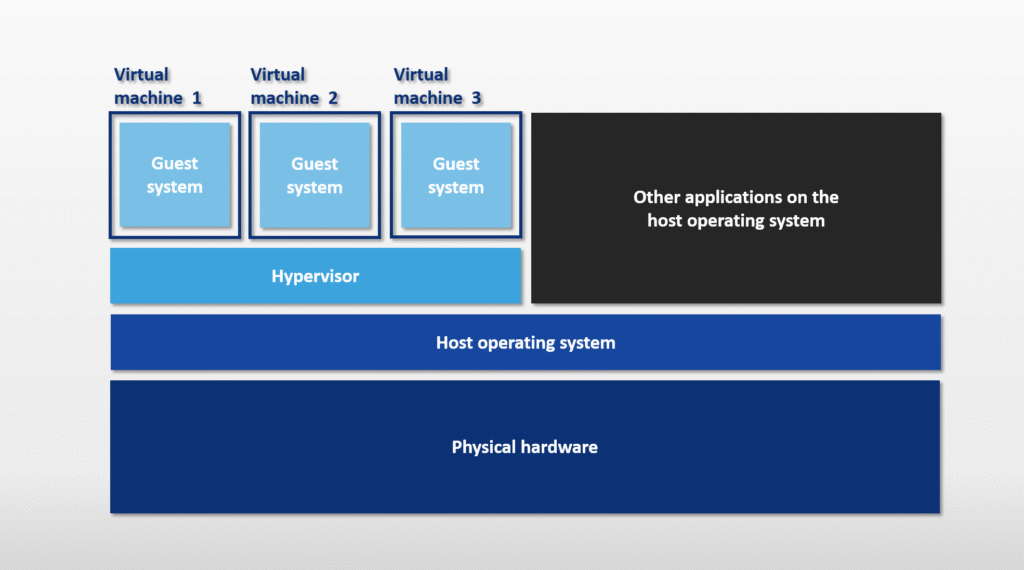
Users interact through two primary interfaces:
- GUI (Graphical User Interface) → point-and-click
- CLI (Command Line Interface) → text-based control
Linux
Born in the 1990s from Linus Torvalds’ kernel and Richard Stallman’s GNU tools, Linux follows a clear hierarchy:
- User →
- Applications →
- Shell →
- Filesystem →
- Kernel →
- Hardware
The real power lies in distributions (distros). Each packages the open source kernel with different tools. Couple of examples from the course:
- Kali Linux. The pentester’s choice. Debian based, preloaded with Metasploit, Burp Suite, Wireshark, and Autopsy
- Ubuntu. User friendly, Debian based, dominant in cloud computing
- Parrot. Security-focused with a polished GUI and forensics toolkit
- Red Hat Enterprise Linux. Enterprise-grade, subscription-based with dedicated support
- AlmaLinux. Free CentOS replacement (CentOS died in 2021), drop-in compatible
Check them all out, and test them in Virtualbox.
Communication happens through shells, the command interpreters. Common variants include:
bash(Bourne Again SHell)zsh(Z Shell)fish(Friendly Interactive SHell)
Commands that matter
Can’t have a Linux course without throwing in some commands.
Navigation & File Operations:
pwd                 # Print working directory
cd /path            # Change directory
ls -la              # List all files (including hidden)
cat file.txt        # Display contents
head -n 5 log.txt   # First 5 lines
tail -f log.txt     # Follow file in real-time

mkdir newfolder     # Create directory
touch file.txt      # Create empty file
rm -rf folder       # Delete recursively (dangerous)
mv old.txt new.txt  # Move/rename
cp file.txt backup/ # Copy
nano file.txt       # Edit text
Finding needles in haystacks:
find /home -iname "*sensitive*"     # Case-insensitive search
find /var/log -mtime -3             # Modified within 3 days
find /tmp -mmin -30                 # Modified within 30 mins
grep "error" application.log        # Search text patterns
Permissions & Users. Permission strings look like drwxrwxrwx.
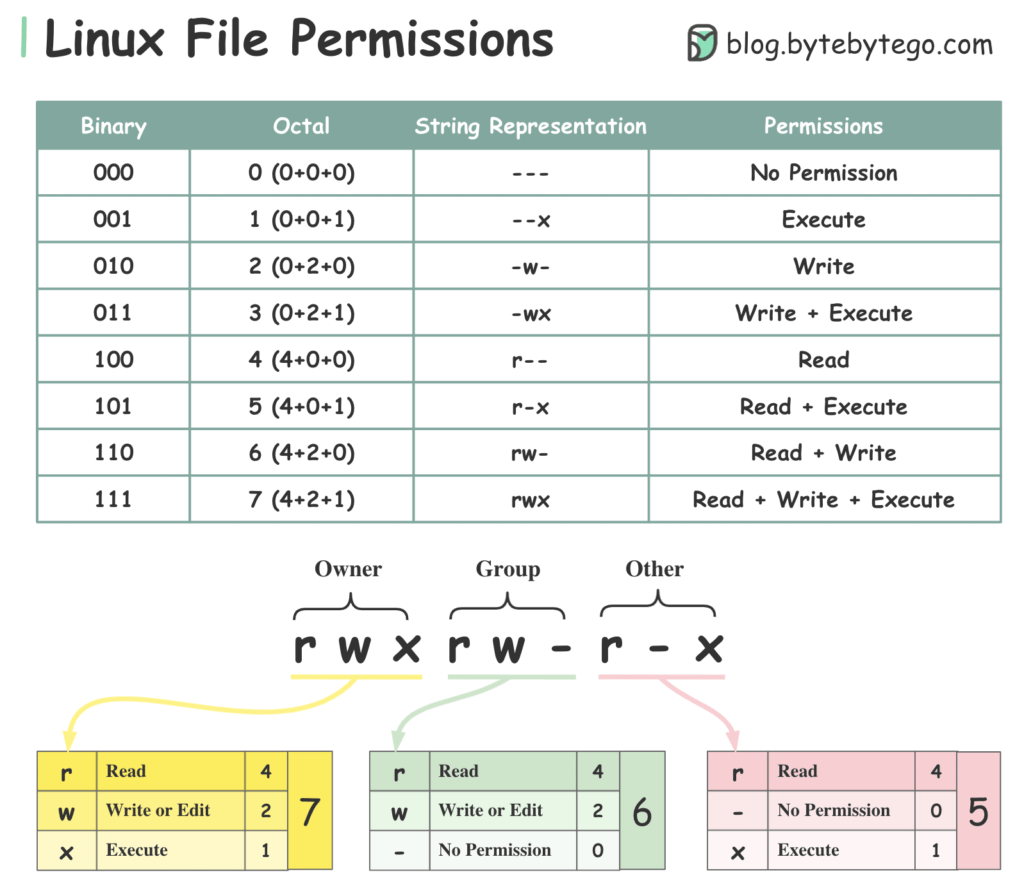
Break them down with:
ls -al              # View permissions
chmod 755 file      # Change permissions
chown user:group    # Change owner and group
Detailed write up.
Never log in as root. It destroys accountability and enables irreversible mistakes. Use sudo instead:
sudo useradd -g analysts -G sudo        # Create user + groups
sudo usermod -aG wheel existinguser     # Add to group without
sudo usermod -L username                # Lock account
sudo userdel -r username                # Delete user files
Getting Help:
man find            # Full manual
apropos keyword     # Search command descriptions
whatis chmod        # One-line summary
SQL
Databases store structured data in tables (rows = records, columns = fields). Relational databases link tables through keys.
- Primary Key. Unique identifier, no duplicates (one per table)
- Foreign Key. References another table’s primary key (multiple allowed per table)
SQL vs. Linux filtering
Structured Query Language (SQL) is a programming language used to create, interact with, and request information from a database
| Aspect | Linux Filtering | SQL Filtering |
|---|---|---|
| Primary purpose | Filters data in files and directories on a computer system | Filters structured data stored in databases |
| Typical use cases | Searching files, parsing logs, managing processes, file permissions | Querying, analyzing, and retrieving data from database tables |
| Access method | Command-line tools in the Linux shell | Accessed through database interfaces, including the Linux command line (e.g., sqlite3) |
| Syntax | Multiple tools with different syntaxes (e.g., grep, find, sed, cut) | Standardized language with consistent keywords (e.g., SELECT, WHERE, JOIN) |
| Data structure | Mostly unstructured or semi-structured text | Highly structured (tables with rows and columns) |
| Readability of results | Often raw text, less organized | Clear, tabular, and easy to read |
| Selecting specific fields | Requires text parsing and pattern matching | Direct column selection |
| Joining data | Not supported natively | Supports joining multiple tables |
| Flexibility | Very flexible for text based data | More rigid but more powerful for structured data |
| Best suited for | Logs and text files not stored in databases | Large, structured datasets in databases |
| Common tools / keywords | grep, awk, sed, cut | SELECT, WHERE, JOIN, GROUP BY |
Essential queries
Couple of queries to get you going.
-- Basic selection
SELECT employee_id, device_id
FROM employees;

-- Filtering patterns
SELECT * FROM log_in_attempts
WHERE country LIKE 'US%';    -- Wildcard: catches US, USA, USB

-- Date/Time filtering (no quotes for numbers)
SELECT * FROM machines
WHERE OS_patch_date BETWEEN '2025-03-01' AND '2025-09-01';

-- Logical operators
SELECT * FROM machines
WHERE operating_system = 'Linux'
  AND email_client = 'Thunderbird';

SELECT * FROM customers
WHERE NOT country = 'Canada'
  AND NOT country = 'USA';
BETWEEN is inclusive on both sides, although the word implies otherwise. So WHERE event_id BETWEEN 5 AND 8; also includes 5 and 8.
Joining Tables Connect datasets using keys:
-- INNER JOIN: Only matching records
SELECT username, office, operating_system
FROM employees
INNER JOIN machines
  ON employees.employee_id = machines.employee_id;

-- LEFT JOIN: All from left table, NULL if no match on right
SELECT *
FROM employees
LEFT JOIN machines
  ON employees.device_id = machines.device_id;
Calculations:
SELECT AVG(height) FROM patients;      -- Average
SELECT COUNT(*) FROM logins;           -- Total records
SELECT SUM(cost) FROM equipment;       -- Total sum
Detailed write up on all of the above and much more.
Next
This one was probably the most difficult one to write about, since it was so basic. I tried to make it somewhat interesting. Next up is Assets, Threats, and Vulnerabilities.