Introduction
I run my daily work off a MacBook, and for a while I told myself I could install nmap and a handful of tools straight onto macOS with Homebrew and call it a day. That works until the first time you run something you don’t fully understand yet against a target, on the same machine that holds your browser sessions, your SSH keys, and everything else you care about. So that got me thinking…
A couple of weeks ago I had some fun with some local stuff on my Mac (here and here). After test driving it a while, I think I’d prefer to keep my attack tools in a VM. That’s what I’m setting up today. Next week will be more experimenting with a proper lab.
Challenge
So, I needed an environment that runs real offensive tooling, resets to a clean state in seconds, and doesn’t put my host machine’s network stack anywhere near a lab environment. On top of that, I’m on Apple Silicon, so anything built for x86 either needs emulation or doesn’t run at all.
Solution
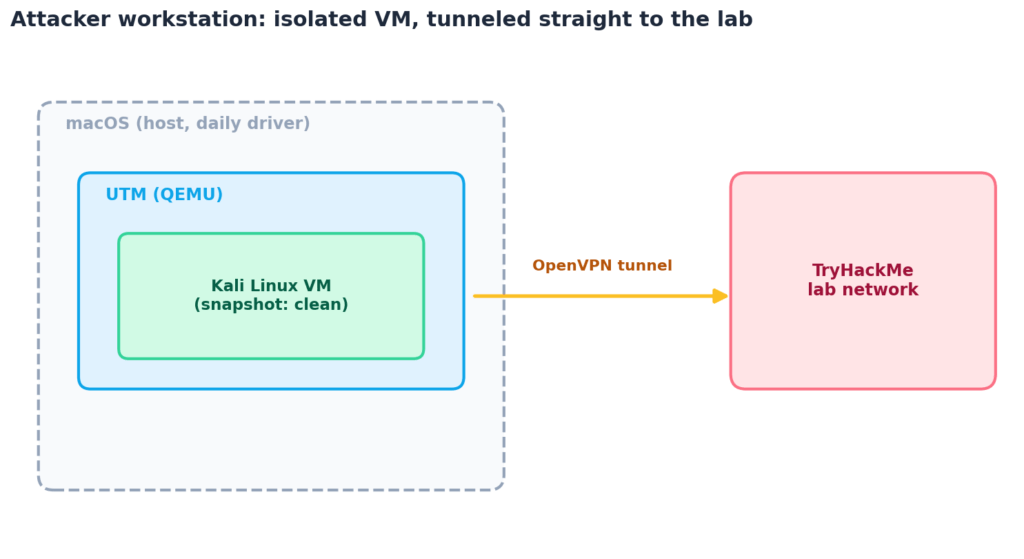
A dedicated Kali Linux virtual machine, built for ARM64, running inside a hypervisor, connected to TryHackMe (THM) over its own OpenVPN tunnel that never touches the host’s network directly.
Tech stack
| Component | Choice | Why |
|---|---|---|
| Host | MacBook, Apple Silicon | What I already own |
| Hypervisor | UTM | Free, open source, native ARM64 via QEMU |
| Guest OS | Kali Linux ARM64 | Pre-loaded offensive toolset, actively maintained |
| VPN client | OpenVPN, run inside the VM | Keeps lab traffic contained to the guest |
| Lab platform | TryHackMe | Where the actual practice happens |
VMware Fusion went free for personal use in late 2024 and is a solid alternative if you’d rather have a more polished GUI, but UTM costs nothing, is fully open source, and Kali publishes official UTM guest instructions, so that’s what I went with.
Key features
- ✅ Fully isolated from the daily-driver Mac, snapshots and all
- ✅ ARM64-native, no x86 emulation tax on Apple Silicon
- ✅ Resets to a known-clean state in under a minute
- ✅ Free and open source from the hypervisor to the guest OS
Setting it up
Install UTM with Homebrew:
brew install --cask utmGrab the Kali ARM64 image from the official Kali downloads page, then either import the pre-built UTM VM from the Kali gallery entry or build one from the installer ISO by following Kali’s own UTM guest VM guide. I gave mine 4 vCPUs, 8 GB of RAM, and 80 GB of disk, which is comfortable for Metasploit, Burp, and a couple of wordlists without ever feeling tight.
Once Kali boots, update it before doing anything else:
sudo apt update && sudo apt full-upgrade -yThen duplicate the VM in UTM (right-click the VM, Clone) while it’s still clean. That clone becomes the baseline I revert to after every session, so a target compromising the VM never costs me more than a re-import.
Network mode
UTM defaults to Shared Network, which behaves like NAT: the VM gets outbound internet access but nothing on the local network can reach in, and nothing the VM does is visible to other devices on the same WiFi. Bridged mode puts the VM directly on the LAN instead, which is exactly what you don’t want when the VM is about to run exploit code.
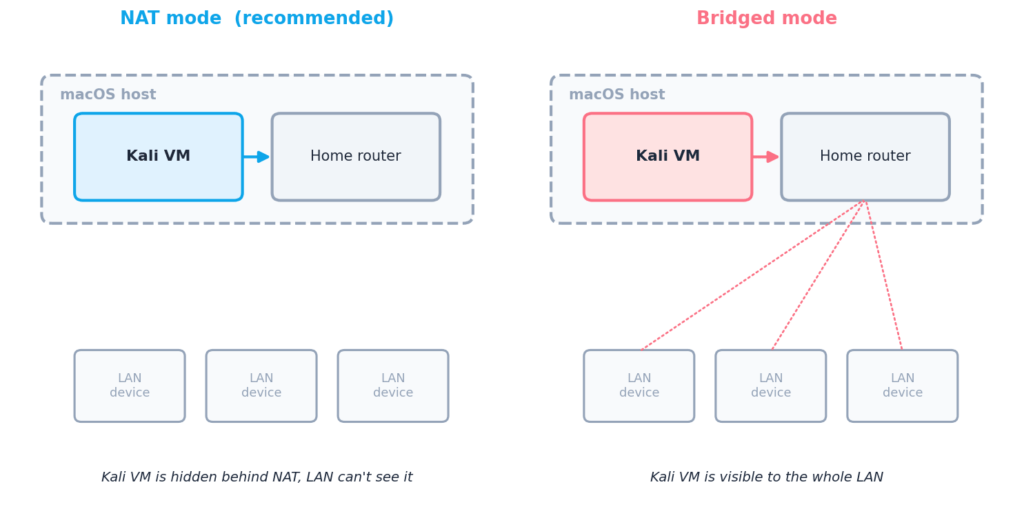
I think you’ll need to keep it on Shared Network (NAT). There’s no scenario in a home lab where the extra exposure of bridged mode buys you anything.
Connecting to TryHackMe
Download the OpenVPN config from the TryHackMe access page, copy it into the Kali VM, and connect from inside the guest, not the host:
sudo openvpn --config ~/Downloads/yourname.ovpnConfirm the tunnel came up:
ip a show tun0
ping -c 3 10.10.10.10
If tun0 shows an IP and the ping gets a reply, the VM is talking to the lab network directly, and the Mac hosting it never touched a single packet. TryHackMe’s help center article on OpenVPN covers troubleshooting if the handshake doesn’t come up.
Results
Setup took an evening, most of it spent waiting for the Kali image to download. Performance inside the VM is close enough to native that I stopped noticing the virtualization layer within a day. The only rough edge so far is UTM’s display driver, which stutters on resize now and then, a cosmetic issue with no effect on anything running in a terminal.
Next
As already mentioned at the top, I want to have a bit more fun on my work machine, and setup a proper lab. Automated of course. Next week we’ll see how easy or difficult this is.