Introduction
Last week we setup a single Kali box as a daily driver. As promised, this week we take it a step further.
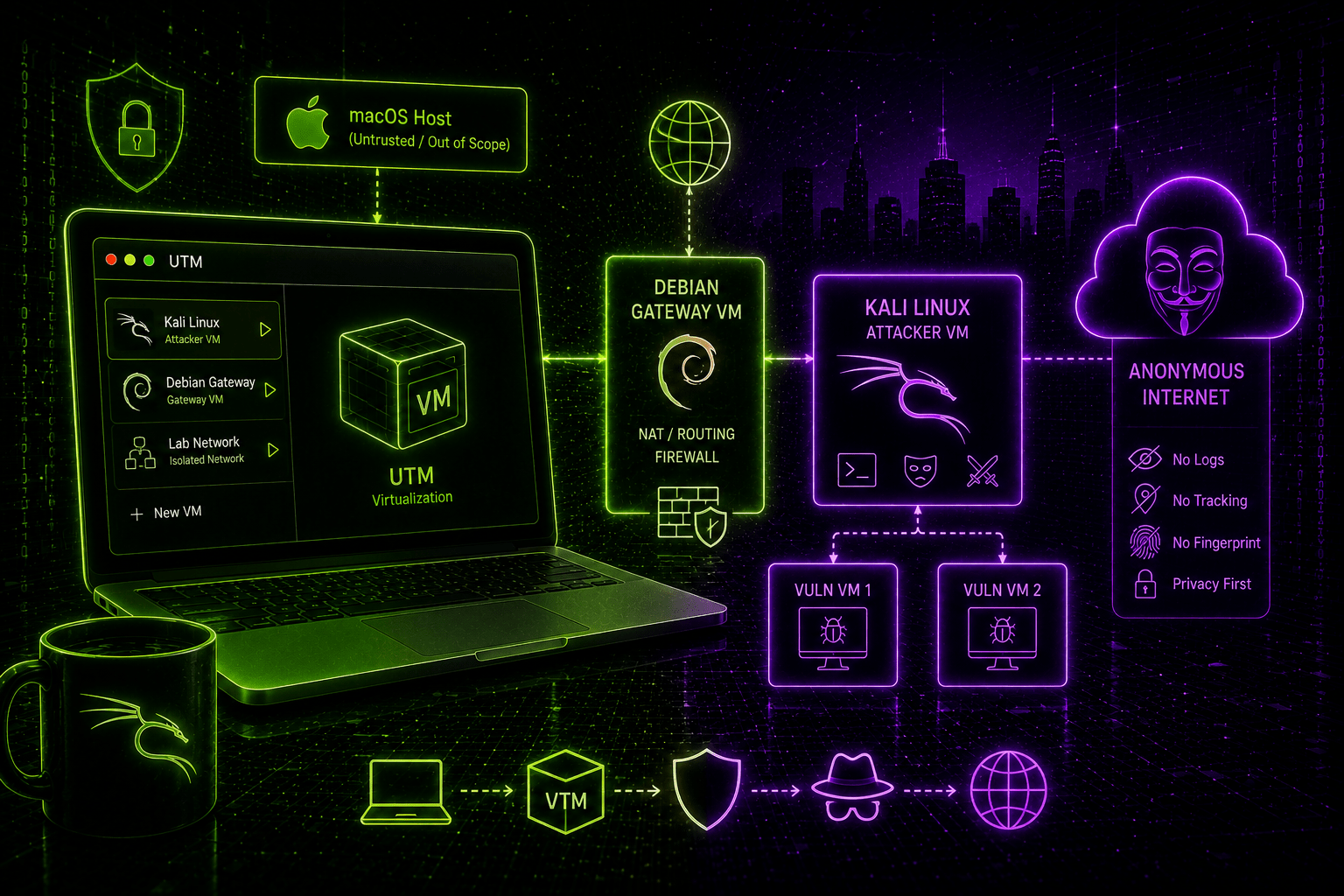
The lab I built in July hands me an attacker box and two targets on an isolated segment, rebuilt from scratch with one command. Every VM in it still reaches the internet over my home connection. For TryHackMe that is fine. For anything where the source address matters, it is a problem.
The obvious fix is a VPN client inside Kali. I built something else instead.
Challenge
A VPN client running inside the workstation protects you until the moment that workstation stops being trustworthy. You run tools as root all day on Kali. Some of them you wrote, some you cloned an hour ago. Anything with root can kill the client, flush the nftables ruleset the kill-switch depends on, or rewrite the routing table. The mechanism enforcing your anonymity sits on the machine most likely to be compromised.
I wanted the enforcement somewhere the workstation cannot reach:
- One VPN gateway VM, holding the credentials, doing the filtering
- A Kali workstation with no independent path to the internet at all
- Fail-closed by construction rather than by a daemon that has to keep running
- The whole thing reproducible and disposable, like the red team lab
Solution
Two VMs on UTM. A Debian trixie gateway with two NICs, and a Kali workstation with one NIC.
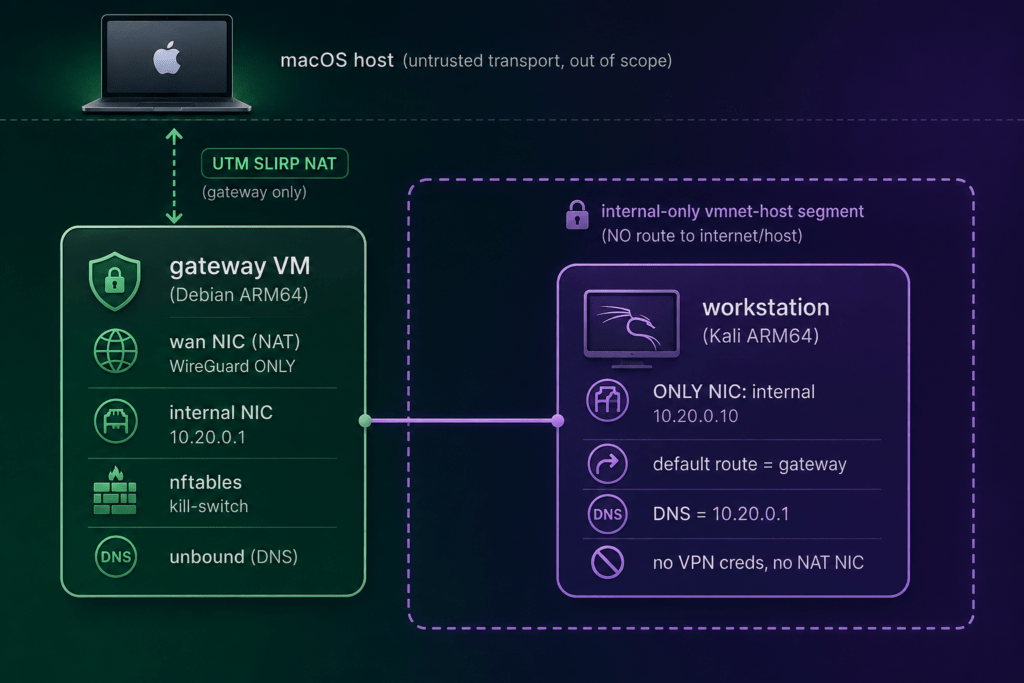
That single NIC is the design. It sits on an Apple vmnet host-only switch that has no gateway of its own and no host port forward. The workstation holds no WireGuard keys. Root on that box gives an attacker a shell and nothing else, because there is no second route to find and no credential to steal, which is the Whonix pattern applied to a Mac.
The gateway runs WireGuard to Mullvad in multihop mode, unbound as the only resolver, and an nftables ruleset whose three chains all default to drop.
Tech stack
| Layer | Choice | Why |
|---|---|---|
| Host | MacBook, Apple Silicon | What I own |
| Hypervisor | UTM (QEMU) | Free, open source, native ARM64 |
| Provisioning | UTM AppleScript + make | Same pattern as the red team lab |
| Bootstrap | cloud-init NoCloud seed | First-boot user, SSH key, static IP |
| Configuration | Ansible | Idempotent roles per machine |
| Gateway | Debian 13 trixie ARM64 | Boring, which is the point |
| Tunnel | WireGuard to Mullvad multihop | Entry and exit in different countries |
| Kill-switch | nftables, policy drop | Fails closed without a daemon |
| DNS | unbound, in-tunnel only | No resolver outside the tunnel |
| Workstation | Kali genericcloud ARM64 | Cloud-init support plus the toolset |
Key features
- ✅ The workstation has one NIC, no VPN credentials, and no route that skips the gateway
- ✅ The only clear-net traffic anywhere is UDP to a single IP and port (the Mullvad entry server)
- ✅
make verifydrops the tunnel on purpose and watches the wire for leaks - ✅ Multihop: my ISP sees Sweden, the internet sees the Netherlands
- ✅
make destroy && make upgives a clean workstation on a fresh exit
Rules
The workstation must never have a path to the internet that does not go through the gateway. Three details carry that, and none of them are cosmetic.
nftables.service starts before wg-quick@wg0, pinned with a systemd drop-in. A hook that fires when the tunnel drops would lose the race at boot, and boot is when the tunnel does not exist yet.
net.ipv4.ip_forward is 0 on disk. The nftables unit turns it on in its ExecStartPost. Forwarding with no ruleset loaded leaks everything, so I made that state unreachable rather than unlikely.
Every ct state established accept names an interface. conntrack keys on the 5-tuple and ignores the output interface, so an unqualified rule will re-admit a flow on the clear-net NIC days after the tunnel died.
On the wire, the gateway’s whole permitted output looks like this:
oifname "enp0s1" ip daddr 170.62.100.10 udp dport 3244 acceptOne address, one port. That address is the Mullvad entry server in Stockholm. The exit in Amsterdam lives inside the tunnel and never appears in the ruleset, which is what multihop gives you: my ISP cannot see which country I come out of. Mullvad hands you a config for the exit server, and the build rewrites a single Endpoint = line to point at the entry instead.
Entry and exit points can be suited to your needs in the code.

Three things that cost me real time
These kind of projects will always cost you more time than anticipated.
Kill-switch false negatives
A kill-switch that passed every test while leaking. I inserted a permissive forward rule as a negative control and ran the suite. Every guest-side probe still reported “blocked”, because the leaked packets left un-SNATed, got no reply, and looked identical to packets that never left. tcpdump -Q out on the gateway’s WAN interface was the only thing that saw them. Watching the wire is now a required part of verification, and every probe has to distinguish “blocked” from “did not run”.
Kali’s default VPN packages
All four kali-linux-* umbrella packages pull in openvpn and vpnc, onto the one host that must never hold a VPN client. None of the twenty-nine kali-tools-* groups do. So the config file names groups without the prefix and the code prepends it, which makes the umbrellas impossible to type. I measured that rather than assumed it, and the build re-measures at install time because the measurement can go stale.
macOS VM network defaults
UTM’s host-only switch takes 192.168.128.0/24, chosen by macOS and effectively immovable. A connected /24 on bridge100 outranks a pushed /18 from a VPN, so macOS bound the VPN’s routes to the bridge. The client reported “connected” and every host behind it went dark. Preflight now refuses to build while a live route’s gateway falls inside that range, and the fix is to disconnect one of the two.
Proving it
Positive checks tell you the tunnel works while it works. They cannot tell you what happens when it stops. make verify stops it on purpose, watches the WAN NIC with tcpdump, then brings it back.
From the workstation, the useful one-liner:
curl -s https://am.i.mullvad.net/json \
| jq -r --arg dns "$(dig +short whoami.akamai.net)" '
    "exit server:  \(.mullvad_exit_ip_hostname)",
    "public ip:    \(.ip)",
    "dns egress:   \($dns)",
    "mullvad exit: \(if .mullvad_exit_ip then "yes" else "NO - YOU ARE EXPOSED" end)"'
exit server: nl-ams-wg-301
public ip: 185.184.222.164
dns egress: 185.184.222.3
mullvad exit: yesThat third result is the one most forget. whoami.akamai.net returns the address of the resolver that actually asked, not yours. Here it lands in the same /24 as the exit, so DNS left through the tunnel. Point that at your ISP’s resolver and you have a leak that no IP check will ever show you. Unbound also has its subnetcache module disabled, because unbound 1.22 enables EDNS Client Subnet by default and ECS tells an upstream which network the client sits on.
Results
A cold build takes about ten minutes and gives me a Kali desktop whose every packet leaves Amsterdam. My ISP sees one UDP flow to Stockholm. Rebuilding picks a new entry and exit pair, so two sessions a week apart share no exit address.
Being fair about what this does not do: against browser fingerprinting, against traffic correlation by someone watching both ends, and against Mullvad itself, the gateway changes nothing. A plain WireGuard config also gets no DAITA, no post-quantum key exchange and no obfuscation, since Mullvad’s own app negotiates those. On a censored network the vanilla Mullvad client is the better tool. Against malware on the workstation and against my own mistakes, the gateway wins clearly, and that is the threat I built it for.
The code and the full threat model are in the repo.
Next
Before my own holiday, I participated in the TryHackMe Hacker Holidays 2026. For someone just starting out in this field, there were some harsh assignments in there, that took me a couple of hours each.
For the coming weeks I’ll try to organize the notes I took, and blog some about it.