
Introduction
Following my Google AI adventure, I left the course and certification unsatisfied. Therefore I’ve researched some more of the technical aspects of AI. Since it is a lot (I simply had A LOT of questions), I’ll divide it into two posts.
Model landscape
When people talk about “AI models” today, they almost always mean Large Language Models (LLMs), neural networks trained on vast amounts of text that can understand and generate human language. But “LLM” is a broad category. There are several major labs producing these models, each with a distinct product lineup and philosophy.
Major labs and their model families
Below a snapshot of the main players as of 2026.
| Lab | Model family | Notable for |
|---|---|---|
| Anthropic | Claude | Safety research, long context, nuanced reasoning |
| OpenAI | GPT / o-series | Widest ecosystem, multimodal, extensive tooling |
| Google DeepMind | Gemini | Massive context window, tight Google integration |
| Meta | Llama | Open source, free to download and run locally |
| Mistral AI | Mistral / Mixtral | Efficient European models, open weights |
| xAI | Grok | Real-time data from X/Twitter, fewer content restrictions |
| Microsoft | Copilot | Built on OpenAI models and deeply integrated into Windows and Office |
| Amazon | Nova / Titan | AWS-native, cost-optimised for cloud workloads |
Model tiers
Each major lab offers multiple model tiers. The pattern is consistent across the industry.
| Tier | Characteristics | Best used for |
|---|---|---|
| Small / fast (e.g. Claude Haiku, GPT-4o mini, Gemini Flash) | Very fast, cheapest | High-volume tasks: classification, summarisation, chatbots |
| Mid-range (e.g. Claude Sonnet, GPT-4o, Gemini Pro) | Fast, balanced | The everyday workhorse for coding, writing, and analysis |
| Flagship (e.g. Claude Opus, o3, Gemini Ultra) | Slower, most expensive | Complex reasoning, research, long multi-step tasks |
The naming schemes change frequently, but the three-tier structure has been remarkably stable. When a new generation launches, expect the mid-range model to approach the previous generation’s flagship capability at a fraction of the cost.
Reasoning models vs completion models
A newer and important distinction is between standard completion models and reasoning models. Standard models generate a response token by token in one pass. Reasoning models spend extra compute thinking through a problem step by step before answering. Think of it like the difference between blurting out an answer versus working through a math problem on scratch paper first.
- Completion models. Fast, great for language tasks, coding, and summarisation
- Reasoning models. Slower and more expensive, but dramatically better at logic, math, and complex multi-step problems
Reasoning models are not always better. For simple tasks they are overkill, like hiring a PhD to answer “what time is it?” Use them selectively.
How LLMs actually work
At their core, LLMs do something that sounds almost embarrassingly simple: they predict the most likely next token (explanation later on in the pricing section). That is genuinely it.
Given a sequence of tokens as input, the model outputs a probability distribution over every token in its vocabulary (typically 30,000 to 100,000 tokens), representing how likely each one is to come next. A few examples of what “most likely next token” looks like in practice:
- After “The capital of France is”, the most likely next token is “Paris”
- After a grammatically complete sentence, the most likely next token is often “.”
- After
def calculate_total(items):, the most likely next tokens form a valid Python function body
This happens one token at a time. The model generates a token, that token gets appended to the input, and the whole thing repeats. This is why LLM output appears word by word rather than all at once.
Training
To get good at next-token prediction, a model is trained on an enormous amount of text, typically hundreds of billions to trillions of tokens drawn from the internet, books, code repositories, and other sources.
The training loop looks like this:
- The model sees a chunk of text and tries to predict each next token
- For each prediction, it is told how wrong it was, by comparing its predicted probabilities to what actually came next
- The weights (parameters) are nudged slightly in the direction that would have made the prediction more accurate, using an algorithm called backpropagation and gradient descent
- Repeat this billions of times across trillions of tokens
What sounds like simple pattern matching produces something remarkable.
Transformers
The architecture that makes modern LLMs possible is called the transformer. When predicting the next token, the model needs to look back at earlier tokens, but not all of them are equally relevant. Consider this sentence:
“The trophy did not fit in the suitcase because it was too big.”
The word “it” refers to the trophy, not the suitcase, because the trophy is the thing that was too big. Resolving that requires connecting words that are far apart. The attention mechanism handles this by:
- Assigning a weight to every earlier token in the context for each token being processed
- Higher weights mean “pay more attention to this earlier word when figuring out what comes next”
- Think of it as a spotlight that can illuminate multiple earlier parts of the input simultaneously, with varying intensity
Modern models stack many layers of attention on top of each other, each one building a progressively more abstract representation of the input. By the final layer, individual tokens have been enriched with context from the entire sequence.
Surprising capabilities
Nobody explicitly programmed LLMs to reason, translate languages, write code, or explain scientific concepts. These abilities emerged as a side effect of getting very good at next-token prediction across a vast and diverse dataset.
A few things that follow from this:
- Capabilities are not designed, they emerge. Scaling up model size and training data consistently unlocks new abilities that were not specifically anticipated
- The model has no explicit “knowledge base”. What looks like knowledge is compressed statistical structure learned from text
- This is also why models can be confidently wrong. If the training data contained confident-sounding incorrect text, the model learned to reproduce that pattern too
Context windows
Imagine you are asking a very smart assistant to help you with a project. But this assistant has a peculiarity: they can only hold a limited amount of text in their head at one time. Everything they know about your current conversation, including your instructions, the documents you shared, and the history of the chat, must fit inside that mental workspace. That workspace is the context window.
Context windows are measured in tokens. A token is roughly 0.75 words in English, so 1,000 tokens is about 750 words. Context window sizes have grown enormously over just a few years.
| Era | Approximate context size | Rough equivalent |
|---|---|---|
| Early models (2020) | 4K tokens | A long essay |
| Mid-generation (2023) | 128K tokens | A short novel |
| Current generation | 200K-1M tokens | Several full books |
| Extended offerings | 2M+ tokens | A large codebase or a shelf of legal files |
Importance of context windows
The context window determines what the model can “see” when generating a response. If your codebase, documents, or conversation history exceeds the window, content gets cut off and the model literally cannot reference it.
Practical implications:
- Document analysis. A large window lets you feed an entire legal contract or research paper and ask questions about it directly
- Long conversations. Without a large window, a chatbot forgets earlier parts of the conversation and becomes inconsistent
- Code understanding. You can paste an entire codebase and ask architectural questions across files
- Cost. Larger contexts cost more, as you pay per token sent and received
- Accuracy. Larger context windows mean lesser accuracy. See also the below
Needle-in-a-haystack
Having a large context window does not mean the model uses all of it equally well. Research shows models tend to be best at information placed at the very start or very end of the context. Information buried in the middle is more likely to be underweighted. This is known as the lost-in-the-middle problem and it is an active area of research.
Put your most critical instructions at the top (in the system prompt) and the most relevant document excerpts close to your actual question, rather than burying them midway.
Hardware stack
For the techies a mini deep dive into how providers run their models, and on what kind of hardware?
CPUs vs GPUs
Your laptop’s Central Processing Unit (CPU) is a general-purpose workhorse. It has a small number of very powerful cores, typically 8 to 32, each capable of handling complex sequential logic quickly. A GPU Graphics Processing Unit (GPU) works differently: it has thousands of smaller, simpler cores designed to do the same operation on many pieces of data simultaneously.
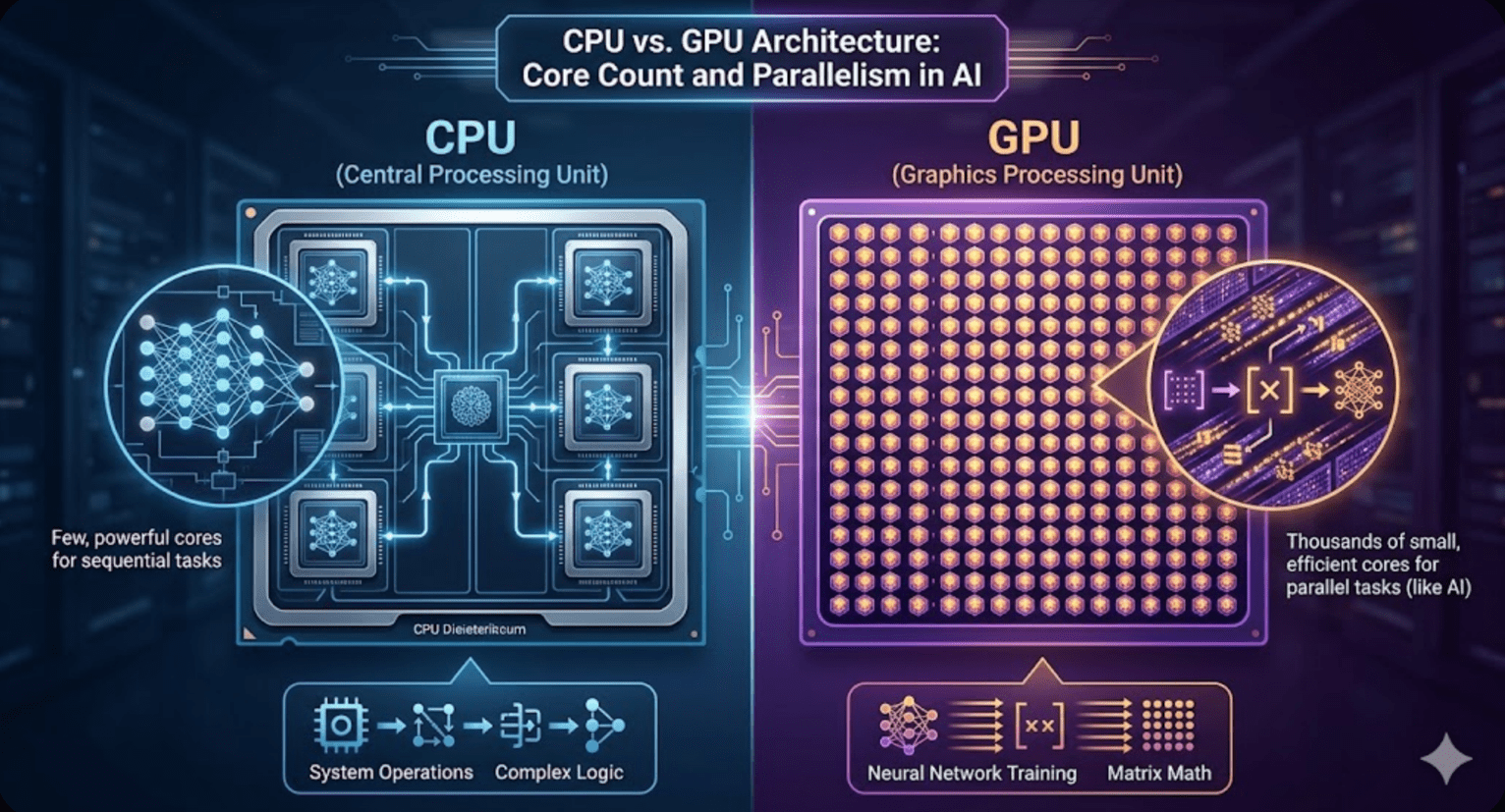
Training an LLM is essentially an enormous amount of matrix multiplication, the same math operation repeated billions of times across billions of parameters. GPUs are purpose-built for exactly this kind of parallel number crunching. An analogy:
- CPU: A few expert chefs who can cook any dish, one at a time, very precisely
- GPU: Thousands of line cooks all doing the same simple task simultaneously
For neural network training, the line cooks win by a massive margin. A single high-end data center GPU can perform thousands of teraFLOPS (trillion floating-point operations per second) for the type of math used in AI, compared to roughly 1-2 teraFLOPS for a high-end CPU. That is a difference of several orders of magnitude for this specific workload.
Training clusters
Training frontier models requires not dozens but thousands of GPUs working in concert.
A modern training cluster looks roughly like this:
- Scale. Meta’s largest open source model was trained on over 16,000 H100 NVIDIA GPUs. GPT-4 is rumoured to have used around 25,000 NVIDIA A100s
- GPU-to-GPU interconnect (NVLink). Within a single server (typically 8 GPUs), NVIDIA’s NVLink allows GPUs to share data at ~900 GB/s, far faster than standard PCIe. This is critical because GPUs constantly need to synchronise gradients during training
- Server-to-server interconnect (InfiniBand). Between servers, InfiniBand networking connects the nodes at 400-800 Gb/s, allowing thousands of GPUs to behave like one giant compute pool
- Storage. Fast distributed storage (often Lustre or GPFS) to stream training data. At this scale, even disk I/O can become the bottleneck
- Cooling. Modern GPU clusters produce enormous heat. Many labs are moving to liquid cooling directly on the chips
Training a large frontier model can cost tens to hundreds of millions of dollars in compute alone, which is why only a handful of organisations can afford to do it from scratch.
Inference vs training hardware
There is an important distinction between training (building the model) and inference (using the model to answer questions). Inference is less compute-intensive per query but must handle millions of simultaneous requests. Companies often use different hardware for each: expensive high-end clusters for training, and more cost-optimised setups for serving inference at scale.
API businesses
Not every AI company trains its own models. A growing category of businesses, sometimes called “AI wrappers”, build products on top of existing models via API. Cursor and Perplexity are two prominent examples.
Monetization
When you pay $20/month for Cursor (AI code editor) or Perplexity (AI search), you are not paying for a model. You are paying for the product layer built around a model.
The value chain:
- Model labs (Anthropic, OpenAI, Google) provide API access and charge per token
- Application companies (Cursor, Perplexity) call those APIs, add product features, and sell subscriptions
- End users pay a flat monthly fee for a polished experience
The key economic question for me was: (how) can the application company make their $20 subscription worth more to users than it costs them in API fees plus overhead?
Unit economics
The math only works because most users do not use the product as intensively as they could. A typical $20/month subscriber might trigger $2-4 worth of API calls. Heavy users might trigger $30+, but they are rare. As long as the average user drives less API cost than the subscription price, the model is sustainable. This is the same logic as a gym membership, profitable because most members do not show up every day.
Application companies also add value beyond the raw API call:
- Cursor. Integrates with your codebase, adds IDE features, and does intelligent context management, deciding what code to include in each prompt. That context management alone is a significant technical product
- Perplexity. Adds real-time web search, source citation, follow-up questions, and a clean interface. They blend multiple models, sometimes using different ones for different tasks, to optimize quality and cost. Check out their browser too

Note: there are many more of such companies, but for the sake of the length of the post, I focused on the above two.
Some application companies negotiate volume discounts with model labs, further improving their margins at scale. A company sending billions of tokens per month pays considerably less per token than a developer on the standard pricing page.
Risk
The “wrapper” business model has one existential risk: the model labs themselves can build competing products. OpenAI building ChatGPT competes with every GPT-powered chatbot. This is why the best application companies focus on deep product differentiation, such as Cursor’s IDE integration or Perplexity’s web index, rather than just prompting a model.
Tokens, millions of tokens (MTok) and pricing
Decided this needed a small section as well, after stumbling on ‘mtok’ for the hundredth time, without actually knowing what it was.
Tokens/mtoks
Models do not process text character by character or word by word. They work with tokens, chunks of text produced by a tokeniser. The tokeniser breaks text into these chunks before the model sees it, and reassembles them on output. Rules of thumb for English:
- 1 token is roughly 4 characters
- 1 token is roughly 0.75 words
- 100 tokens is roughly a short paragraph
- 1,000 tokens is roughly a page of text
Tokenisation is not purely word-based. Common words like “the” or “is” are single tokens. Rarer words may be split into multiple tokens. Code tends to use more tokens per character than plain text, and emojis can be surprisingly expensive.
Pricing
Model providers charge separately for input tokens (what you send) and output tokens (what the model generates). Output tokens cost more, because generating text is more compute-intensive than reading it. Prices are listed per million tokens, abbreviated as MTok.
As a rough guide (verify on each provider’s pricing page, as these change frequently):
| Tier | Input per MTok | Output per MTok |
|---|---|---|
| Budget / fast (small models) | $0.05 – $0.80 | $0.30 – $4.00 |
| Mid-range (everyday models) | $1.00 – $5.00 | $5.00 – $20.00 |
| Flagship / reasoning | $2.00 – $25.00 | $8.00 – $80.00 |
Practical cost calculations
To estimate your costs: count the tokens in your prompt plus any context (input), add an estimate of the response length (output), then multiply by the relevant rate.
Using a mid-range model as an example (Claude Sonnet at $3.00 input / $15.00 output per MTok):
- You send a 2,000 token prompt and get an 800 token reply
- Input cost: 2,000 / 1,000,000 × $3.00 = $0.006
- Output cost: 800 / 1,000,000 × $15.00 = $0.012
- Total per call: roughly $0.018 (under 2 cents)
That feels negligible in isolation, but cost compounds quickly with volume:
- 50 calls/day (personal use or testing): ~$0.90/day, ~$27/month
- 1,000 calls/day (small production app): ~$18/day, ~$540/month
- 10,000 calls/day (high-volume app): ~$180/day, ~$5,400/month
This is why high-volume applications care deeply about prompt efficiency. A prompt that can be shortened by 500 tokens directly reduces costs at scale.
Prompt caching
Major providers now offer prompt caching. If you send the same long system prompt or document prefix on every request, the model can cache the computed representation of that prefix. Subsequent calls that reuse it are charged at a heavily discounted rate, often 90% less for the cached portion. For applications with a large fixed system prompt this can dramatically cut costs.
Next
It was a pretty long post, and next week we’ll finish up with an evenly long post in part II.